Entra: investigate a principal
App route: /entra/investigate or /entra/investigate?principal_id=<object-id>
Product permissions: entra.read opens the Entra shell; investigate.read resolves, searches, views and exports a dossier; investigate.activity separately permits behavioral history.
Purpose
Investigate converges what the product already knows about one user, guest, group, service principal, managed identity, platform principal, deleted object, or cross-tenant principal. It keeps structural access separate from behavioral activity and preserves source freshness, truncation and unreadable states instead of turning missing evidence into a clean result.
A principal whose snapshot state is disabled is marked twice in amber: the header shows ⚠ disabled and the warning banner says ⚠ This account is disabled. The stronger treatment prevents a consequential account state from disappearing among neutral identity metadata. It is a warning, not a remediation action and not proof that role assignments, group membership, active tokens, findings, or historical activity have been removed.
Prerequisites and data sources
- A selected Entra connection and a completed Entra collection for identity, roles, findings, activations and other directory evidence.
- The Azure IAM/access cache for Azure assignments, group-derived reach and access-change history.
- Product permission
investigate.read;entra.readis also required by the frontend route. - Product permission
investigate.activityonly when sign-ins, risk detections, directory audit or Azure Activity Log records are needed.
The base dossier endpoint reads caches only. Sources carry collected time, unreadable reason and truncation. The UI additionally requests applicable non-Azure activity once per principal on arrival, initially over 24 hours, under investigate.activity; an unfilled justification is allowed on that automatic request. Azure Activity Log and live membership trees remain explicit opt-ins.
Tabs and actions
| Control | Behavior |
|---|---|
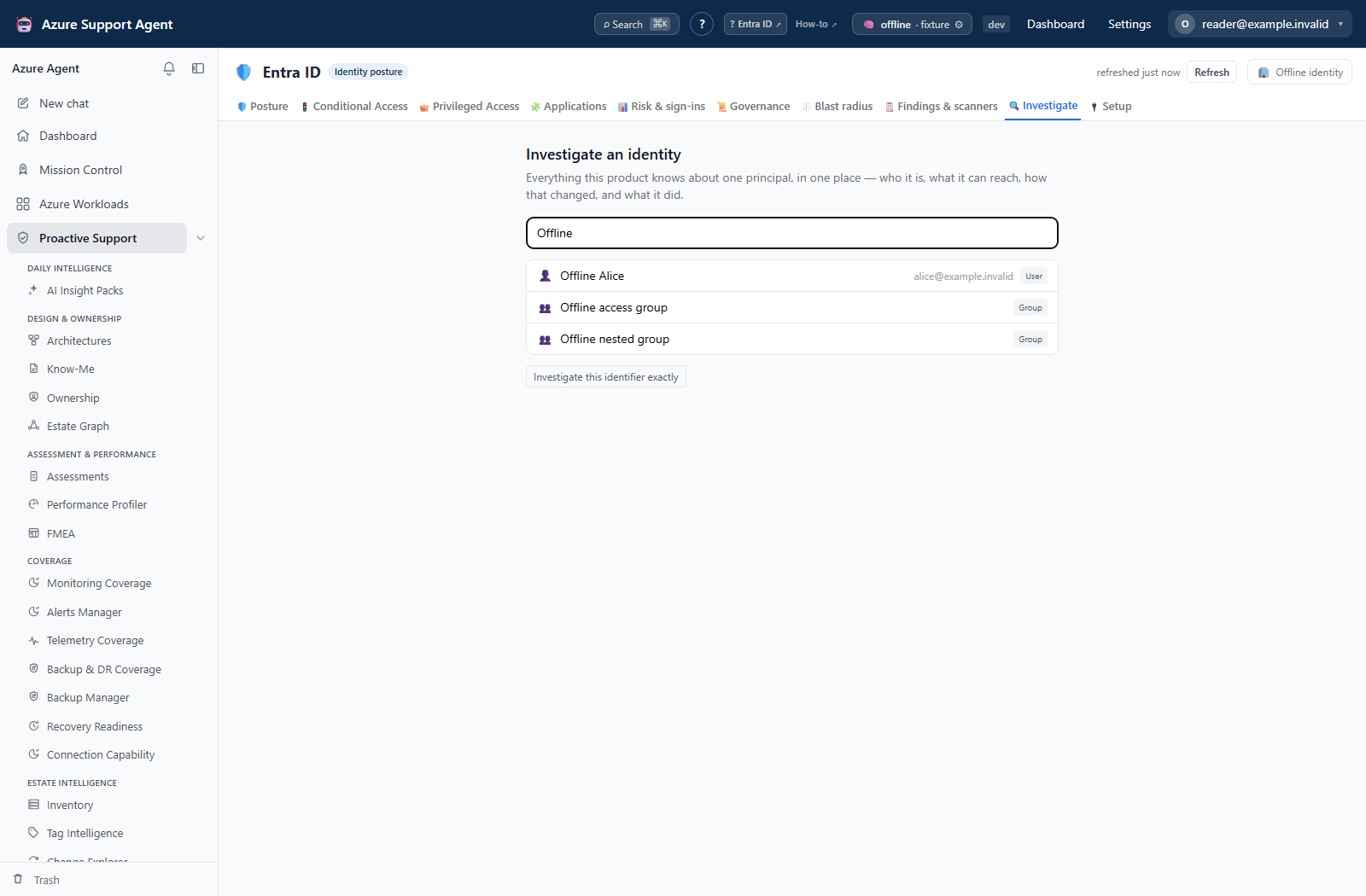
| Search | Type-ahead across users, groups and service principals after two characters; an exact identifier can also resolve deleted, cross-tenant or otherwise unresolved assignments |
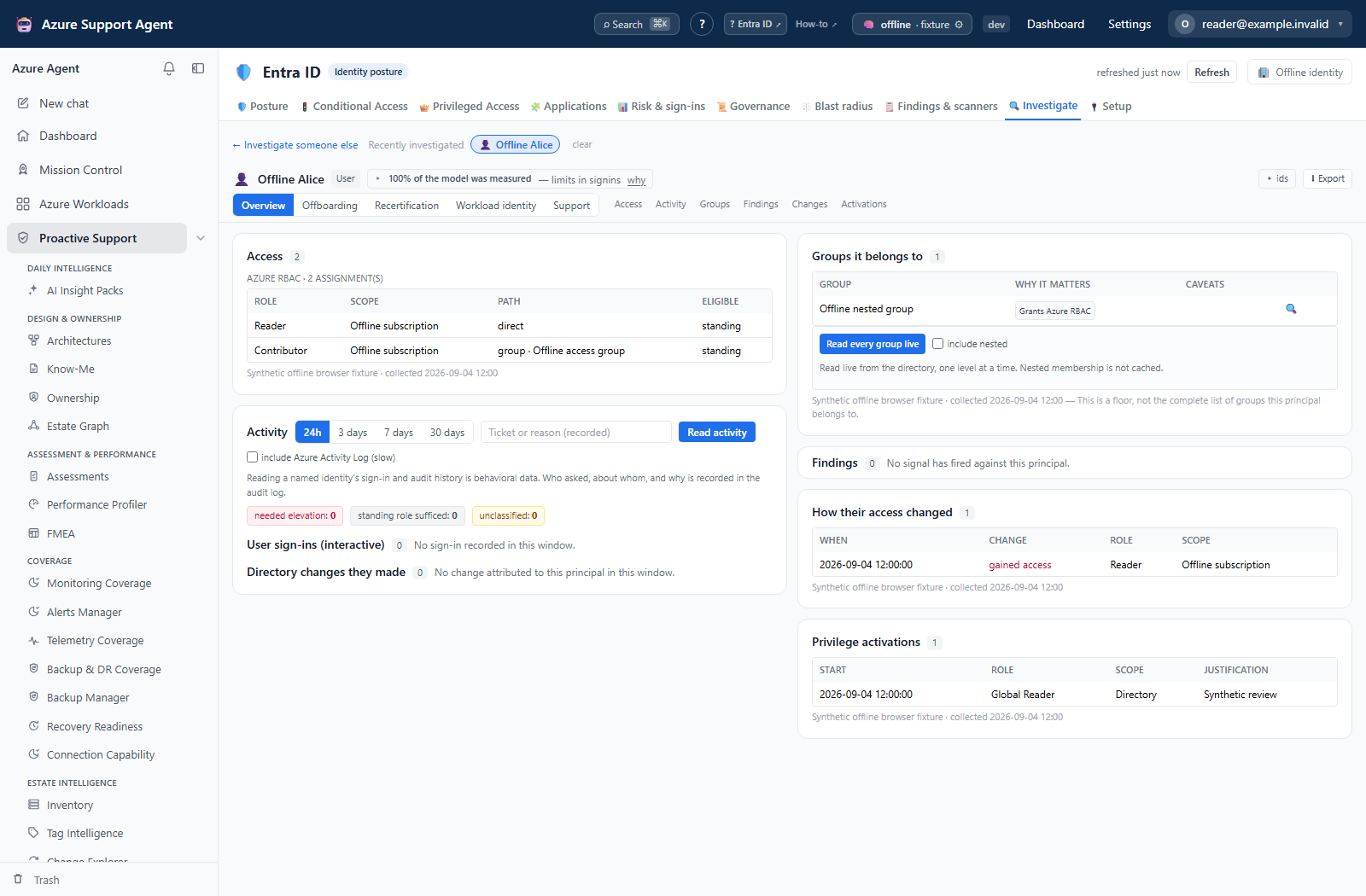
| Recently investigated | Shows up to the caller’s own 25 recent principals from investigate.view audit rows; clear stores a browser watermark and hides chips without deleting audit history |
| Lenses | Overview, Offboarding, Recertification, Workload identity, and Support reorder the same applicable sections; they do not collect different data |
| Section links | Jump to Activity, Access, Members, Findings, Changes, or Activations when that section applies to the principal kind |
| Members / Groups it belongs to | Show member tree, Show parent groups, or Read every group live reads structural membership; include nested adds transitive upward membership. Requests are bounded to 25 expansions, 200 children per node and 1,000 nodes overall |
| Read activity | Reruns applicable sign-ins, risk and directory audit after the automatic arrival read; the UI offers 24 hours, 3, 7 or 30 days and records the supplied justification |
| Cancel activity | Stops the browser wait; the request remains audited and may finish on the server |
| Include Azure Activity Log | Adds the slower per-subscription resource-plane read; it is off by default and only queries subscriptions where current access puts the principal in scope |
| Export | Produces an XLSX dossier with Identity, Directory roles, Azure access, Findings, Timeline, Activations, applicable Members, and Provenance sheets |
Warnings also distinguish deleted objects, cross-tenant principals, unreadable/not-found objects, role-assignable groups and dynamic groups. Dynamic membership removal is called out because the rule can add the member again; a role-assignable group is highlighted as an escalation path.
Freshness and scope behavior
The dossier reflects the selected tenant and the current cached Entra/IAM evidence. The disabled warning is only as current as the people snapshot; verify snapshot age before making an access decision. A cache read that fails marks the affected section unreadable rather than returning an empty claim.
Activity is live and windowed. Interactive and non-interactive sign-ins have separate 500-row caps, risk detections a 200-row cap, and directory audit a 500-row cap. The body accepts 1–365 days, but Graph reads clamp to 30; the UI therefore cannot retrieve a year of Graph activity. Non-interactive sign-ins require enabled Graph beta endpoints. Azure Activity Log scope is derived from subscriptions where the principal currently holds access, so an operation in a subscription whose access was later removed can fall outside the query. Group-tree reads have the limits listed above and report notes when clamped.
Workflow overview
- Select the intended connection and search by name, UPN, object ID or app ID.
- Confirm tenant, object ID, principal kind, resolution, account-state badge and warning banners.
- Choose the lens that matches the decision; for a disabled person, Offboarding leads with access and membership rather than activity.
- Review Access, Members, Findings, Changes and Activations with each section’s provenance.
- Expect the automatic non-Azure activity read when the principal’s capabilities support it. Add the review reason before a deliberate reread; keep Azure Activity Log off unless needed.
- Export when a portable evidence artifact is required, then validate conclusions in the current Entra/Azure source before changing anything.
Resolve the principal and trace access
These examples use browser fixtures to illustrate dossier navigation. They do not represent live Graph reads or a backend-computed security assessment.
Read cached membership and change evidence
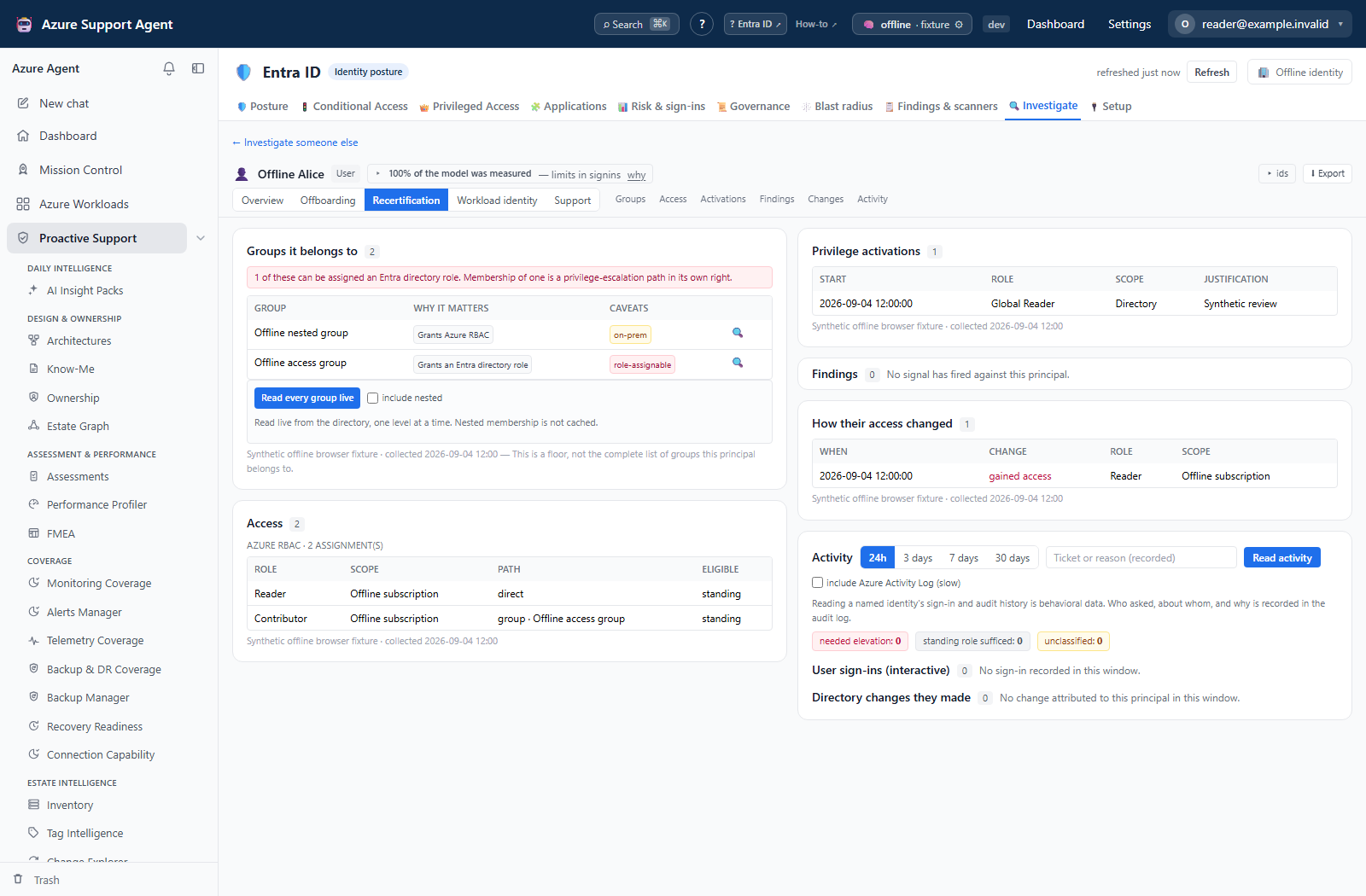
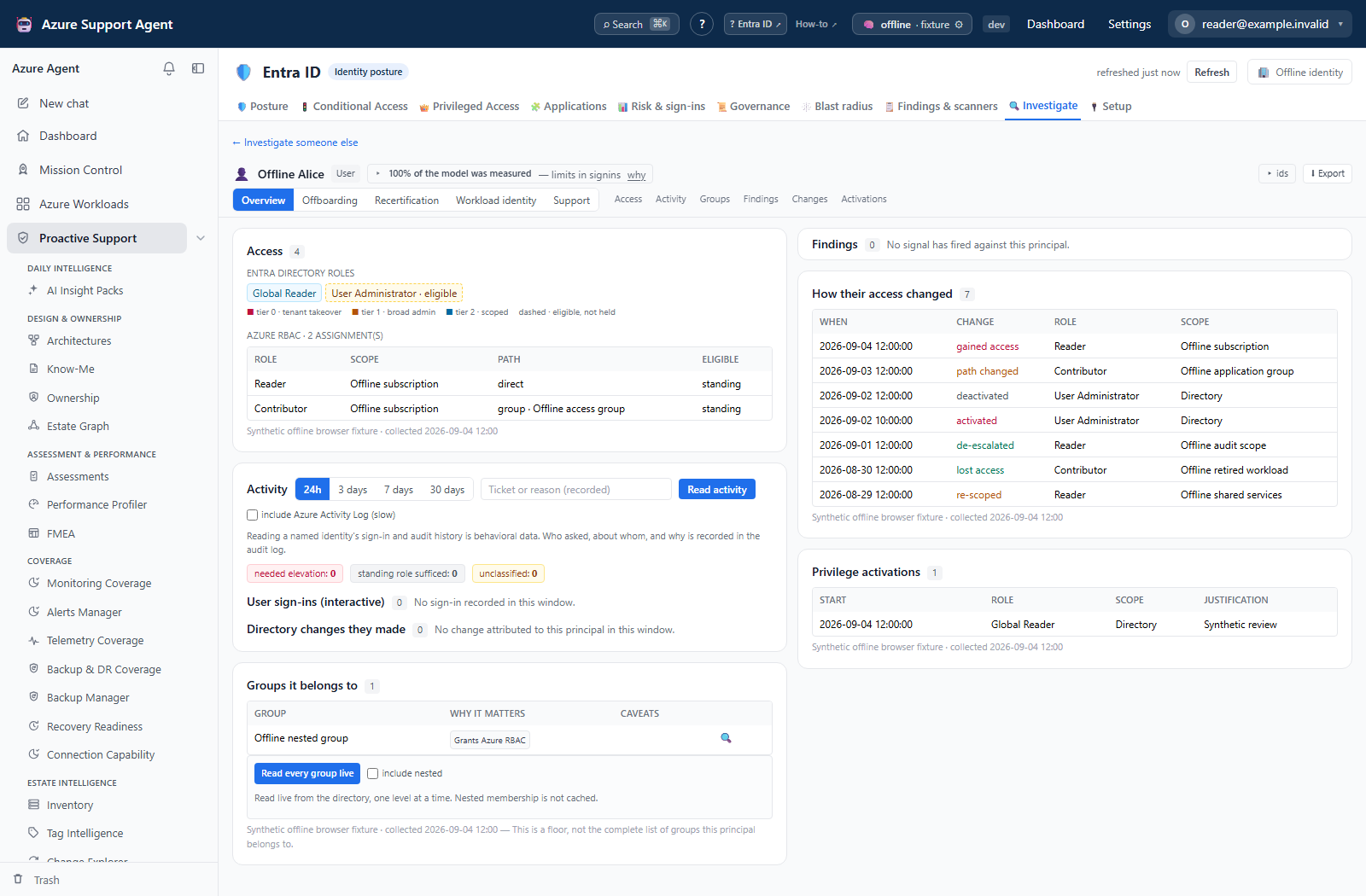
For the on-demand user membership, direct group-member and nested-cycle examples, follow How to expand memberships without losing coverage limits.
Interpretation of results
- Disabled means the cached directory object has
enabled=false. It does not mean access assignments were deleted or that all issued sessions/tokens have been revoked. - Eligible is not standing access; an eligible role must be activated.
- Unreadable is not empty. The section makes no claim when its source could not be read.
- Deleted can be the finding: an assignment can outlive its directory object.
- Cross-tenant means the local tenant can show the assignment but cannot inspect the foreign principal itself.
- No activity in the window is bounded evidence, not proof that the identity was never used.
Exports, history, scheduling, and integrations
Dossier and export views write investigate.view and investigate.export audit events. Activity and group-tree reads write investigate.activity and investigate.members, including actor, principal, connection and bounded request metadata. Recent history is reconstructed from the caller’s own dossier-view audit rows.
The XLSX includes cached structural sections, applicable Group memberships and Provenance. It rebuilds the dossier; it does not include the live activity response or branches expanded in the browser. Do not describe it as a complete export of everything currently visible. This feature has no schedule or notification control. Check the exact principal and connection after every handoff.
Safety and limitations
- The dossier, warning and export do not disable, enable, remove, revoke or otherwise modify a directory object, Azure assignment or policy.
- Behavioral history is separately permissioned and every request is audited because it concerns a named identity. Enter a real internal justification, but do not copy identities into public examples or documentation.
- The base dossier is cached and can be stale. Validate consequential state and assignments against authoritative Entra/Azure records before remediation.
- Activity and membership reads are capped and can be partial. Preserve truncation and unreadable labels in any conclusion.
- Exported workbooks contain sensitive identity and access metadata; protect them as governance evidence.
Troubleshooting
| Symptom | Cause and resolution |
|---|---|
| A known disabled account has no amber badge/banner | The selected snapshot may predate the change, the wrong tenant/object may be selected, or enabled state is unreadable. Refresh Entra, reselect the exact object, and verify in the Entra admin center. |
| Structural sections load but Read activity is denied | investigate.read covers the dossier; behavioral history requires investigate.activity. Request that capability or continue with structural evidence only. |
| A section says it could not be read | Its named cache or collector failed. Fix that source/consent and refresh; do not interpret the section as zero access or zero findings. |
| A deleted assignment does not resolve to a name | The surviving assignment no longer has a directory object. Use its resolution and access evidence; do not relabel the raw ID as a live principal. |
| Group tree reports truncation | Narrow the branches opened in one request. Each request is bounded to 25 expansions, 200 children per node and 1,000 total nodes. |
| Azure Activity Log contains no operations | It is opt-in, windowed and scoped to subscriptions where current access is known. Check the checkbox, window, access-cache freshness and scope note. |
| clear removes recent chips but audit still contains views | Intended. Clear stores a browser watermark; it never deletes audit records. |