Entra: findings and scanners
Product permission: entra.read to view scanners, findings and the inbox; entra.admin to run a scanner or change any finding state.
Purpose
App route: /entra/findings — tab label Findings & scanners
This is the working queue. Every other Entra tab explains a domain; this one turns the snapshot into a list somebody can actually clear. It holds three sub-tabs: the Findings inbox, the Scanners, and Identity hygiene — the former standalone identity overview, kept separate because it comes from a different pipeline with its own refresh, and folding it into the inbox would put two freshness models under one “last refreshed” claim.
A scanner detects nothing of its own. Every check already exists as a signal in the registry; a scanner is a named selection of signals with a cadence and a severity floor. The part that decides whether any of this is useful is the delta between runs.
Prerequisites and data sources
- Product permission
entra.readfor the scanner list, per-scanner findings, and the inbox.entra.adminfor Run, for a single finding’s state change, and for the bulk action. A read-only principal attempting either receives a permission error. - A completed Entra collection for the native inbox/scanners. Embedded Identity hygiene instead uses its separate cache and requires
identity.readfor viewing and refreshing. - Consent tier determines which scanners can run at all. A scanner that requires a domain the tenant is blind to reports that it cannot run rather than reporting zero findings — “no findings” and “could not look” are the same picture and opposite facts. See Entra setup and coverage.
- Entra ID P1 for Conditional Access and sign-in data; Entra ID P2 for Identity Protection risk, PIM depth and governance. An unlicensed domain blocks the scanners that depend on it.
- Optional: a notification channel, if you want a scanner run to publish its delta.
Tabs and actions
Scanners
Twelve scanners ship with the product. Each one lists its cadence, its signal count, its severity floor, its last run with the counts from that run, and a cannot run marker with the reason when a required domain is unavailable.
| Scanner ID | Name | Cadence | Floor | Requires |
|---|---|---|---|---|
entra.daily_critical | Daily critical sweep | daily | critical | — |
entra.credential_expiry | Credential expiry watch | daily | low | apps |
entra.privileged_review | Privileged access review | weekly | medium | roles |
entra.ca_drift | Conditional Access drift | daily | medium | ca |
entra.breakglass | Break-glass health | daily | low | — |
entra.consent_watch | Consent and OAuth watch | daily | medium | apps |
entra.guest_lifecycle | Guest and lifecycle hygiene | weekly | medium | people |
entra.auth_posture | MFA and authentication posture | weekly | medium | people |
entra.risk_sweep | Risk sweep | daily | medium | risk |
entra.governance_sweep | Governance sweep | weekly | medium | — |
entra.monitoring | Monitoring and hybrid | daily | medium | — |
entra.full_posture | Full posture snapshot | weekly | low | — |
entra.daily_critical selects every critical signal in every pillar, whatever its domain. entra.credential_expiry and entra.breakglass select a named list of signals. The rest select whole pillars — privileged access, Conditional Access, applications and consent, people, authentication, risk, governance, monitoring. entra.full_posture selects every pillar and is the weekly baseline.
Cadence is the scheduler’s hint, not a cron: daily means at least a day since the last run, weekly at least seven. Running from the screen overrides that, so you can re-run a scanner as often as you like while investigating.
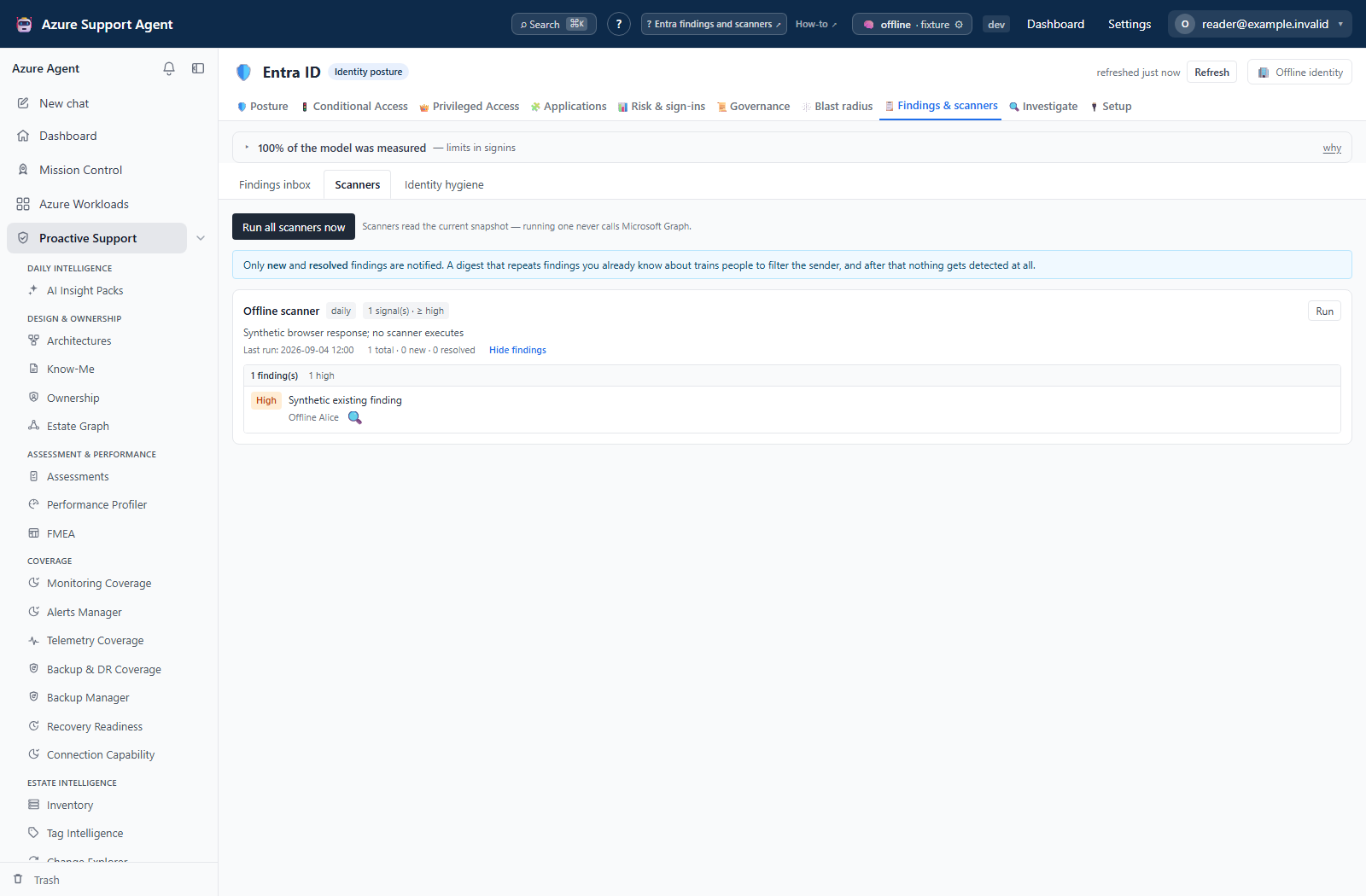
The following screenshots display saved browser-fixture results. They illustrate how to read a scanner and its findings, not a computed security assessment; no scanner run or notification was invoked for these views.
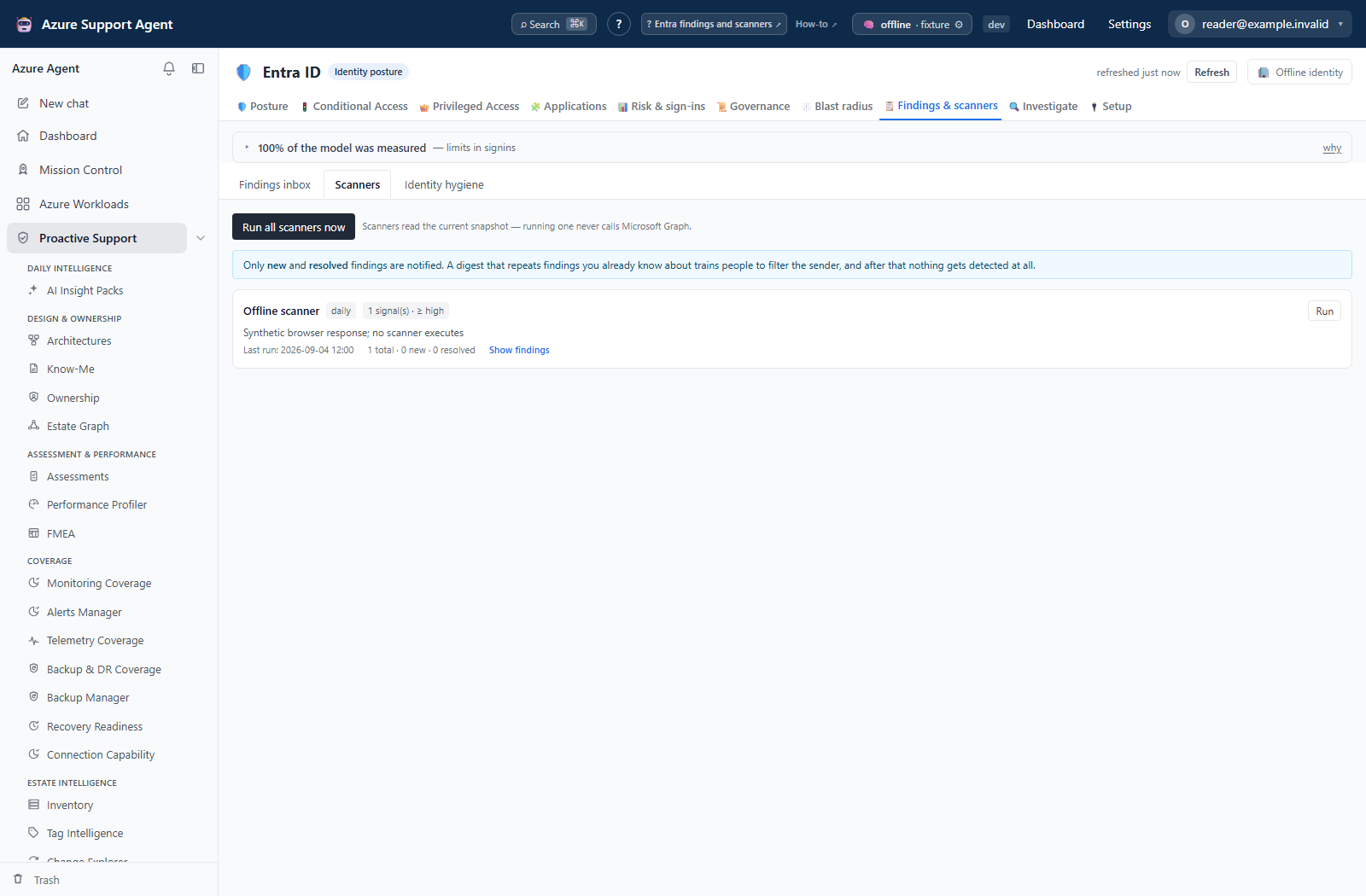
Run on a single scanner, or Run all scanners now, evaluates the selection against the current snapshot and records the run. A run reports the total it found, and either “first run, recorded as the baseline” or the number new and resolved since the last run. Anything in the always-immediate list is called out separately.
A run can optionally notify through the API, but the current UI explicitly sends notify=false and offers no notification checkbox. Twelve signals are marked always-immediate in the catalog; that classification does not override the request’s notify flag. When enabled, this endpoint publishes one notification per changed scanner, including its immediate count, rather than a separate message per immediate finding. First-run findings can notify when notify=true; do not assume the IAM scanner’s first-run silence applies here.
Show findings expands what a scanner reports right now, worst first, with a per-severity breakdown and a new since last run marker. This view is deliberately read-only and does not record a run: if opening the screen marked every finding as seen, the next real run would report “nothing changed” precisely because somebody looked. It shows the first two hundred and says so when there are more.
Findings inbox
The inbox is the same findings joined to first-seen dates and workflow state. Age is what turns a list into a conversation — a two-hundred-day-old critical is a different problem from one that appeared this morning, and a raw findings list cannot tell them apart.
The UI offers Critical/High, Open/Snoozed, Unassigned, Ageing > 30d and text search, plus sortable columns. It requests the first 500 rows without a paging control. The API also accepts pillar, other severity/state filters and offset/limit up to 2,000. The header’s recently resolved count covers at most 50 ledger entries, not an all-time total.
Selecting rows opens a bulk bar for state, reason and snooze duration. Assignee and note are API fields, not controls on the current bar. Bulk requests update at most the first 2,000 fingerprints; compare the returned updated count with the request. The drawer offers Acknowledge, Suppress and Reopen.
| State | Meaning | Rules |
|---|---|---|
open | Untouched, or a snooze that has expired | Default |
acknowledged | Seen and accepted as work | — |
snoozed | Hidden until a date | Requires a positive number of days so it expires on its own |
suppressed | Deliberately excluded | Requires a reason; refused without one |
An expired snooze returns to open by itself. Nobody should have to remember to un-snooze something.
Freshness and scope behavior
One snapshot per tenant serves every Entra tab. Scanners run against the current snapshot and never collect fresh data themselves. Keeping scan and collect independent is deliberate: it means a scanner can be re-run a dozen times during an investigation without hammering Microsoft Graph, and a scanner schedule and a refresh schedule stay separately controllable.
The consequence is that a scanner is only as current as the snapshot beneath it. If the tenant changed an hour ago and the snapshot is a day old, the scanner will faithfully report yesterday. Refresh from the freshness badge, wait for the collection to finish, then run the scanner.
Workflow state is never rewritten by a collection. A suppression that disappeared on the next refresh would be worse than no suppression, so the ledger that tracks first-seen and last-seen is stored separately from the state that records your decisions.
Interpretation of results
A fingerprint is the stable identity of a finding: a short hash of the signal, the object, and a discriminator. It deliberately contains no timestamp and no count, which is why the same underlying condition produces the same fingerprint on every run. That single property is what makes “new since last scan”, snoozing, ticket links and delta notifications work at all — state attaches to the fingerprint, so it survives a refresh instead of being lost when the finding list is rebuilt.
Resolution is computed from fingerprints absent from evaluated findings, never from a cloud remediation action. Suppression, reduced coverage or a failed collector can also remove a fingerprint. Validate equivalent coverage and authoritative state before treating a resolved ledger entry as a fixed control. The scanner run updates the ledger; simply opening its results does not.
Read the three delta terms precisely. New means absent from the previous run of this scanner. Resolved means present last time and gone now. Persisting means present in both, with an age. A scanner that has run before will report zero new for weeks while sitting on hundreds of open findings, which is why the total is always shown alongside the delta.
Safety and limitations
- Every workflow state is local to this product and is never written to Entra. Acknowledging, snoozing, suppressing, assigning or annotating a finding changes nothing in the directory. It does not dismiss a Microsoft recommendation, close an Identity Protection risk, or alter any policy.
- Suppression hides a real condition until somebody un-suppresses it. The finding does not stop being true; it stops being visible in the default view. That is why a reason is mandatory, why the suppressed count stays on the header, and why suppression should be reviewed rather than treated as closure.
- Suppression removes the fingerprint before native Entra scoring and listing. It can raise the score without remediation, and the suppressed row is not recoverable simply by filtering the inbox. Retain its fingerprint/reason for an API reopen or an external suppression register.
- Running a scanner is read-only against the snapshot and does not call Microsoft Graph.
- Scanner runs and state changes are recorded in the audit log with the actor, the scanner or state, and the reason.
- A blocked scanner reports why it cannot run. Treat that as a coverage gap, not as a clean result.
- Findings are only as accurate as the snapshot: sampled sign-in windows, capped enumerations and eventual consistency all apply. Verify in the Microsoft Entra admin center before remediating.
- Bulk actions apply to a bounded number of selected findings per request; large selections are truncated rather than partially applied without limit.
- Exports and screenshots contain sensitive identity metadata. Do not paste live tenant, object or user identifiers into tickets or prompts.
Troubleshooting
| Symptom | Check |
|---|---|
| The tab says the snapshot is cold | Start a collection from the freshness badge; scanners never collect. |
| A scanner shows cannot run | The domain it requires is blind, unlicensed or not collected. Fix consent on Setup & coverage and re-collect. |
| A scanner reports zero new but the queue is full | Zero new is a delta, not a total. Read the total beside it. |
| Findings do not change after a directory fix | The snapshot predates the fix. Refresh, then re-run the scanner. |
| Suppressing or snoozing returns a permission error | Both require entra.admin, not entra.read. |
| A suppression is refused | A suppression requires a reason; a snooze requires a positive number of days. |
| A snoozed finding reappeared | The snooze expired and the finding returned to open on its own. |
| A finding vanished without anybody closing it | The condition stopped appearing and was recorded as resolved automatically. |
| No notification arrived after a run | Nothing was new or resolved, the scanner was blocked, or the run was made without the notify option. |
| The inbox is empty under a filter | Clear severity, state, ageing and search — filters combine. |