Durable Work Batches
App routes: each owning feature’s Fleet view; workload-group actions under /workloads/groups/:id.
Purpose
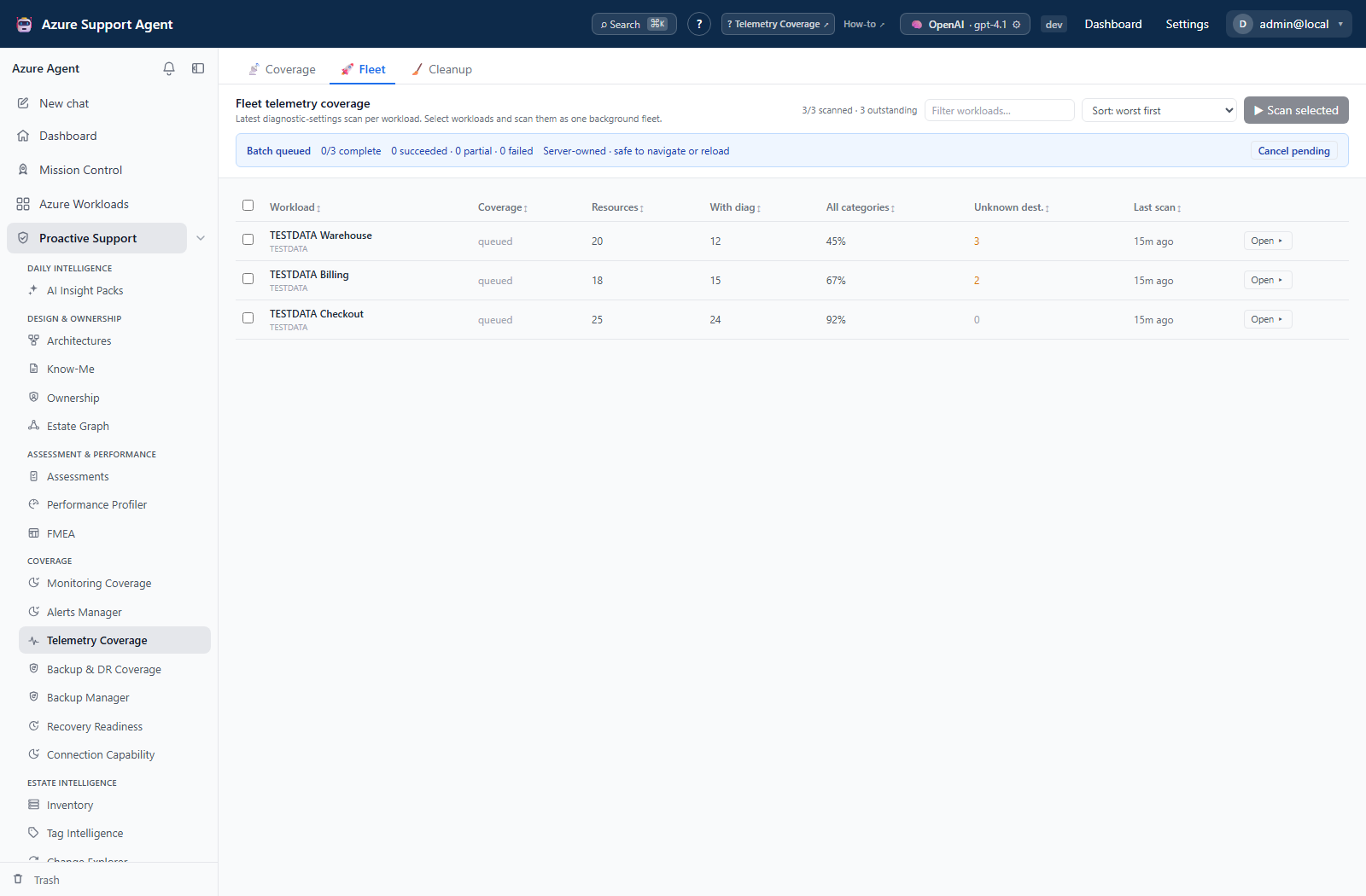
Multi-workload work does not run in the browser. When you start a fleet sweep, the server creates a work batch — a persistent record that owns admission, ordering, progress, retries, cancellation, and restart recovery for every item in that run.
The consequence users notice is the useful one: you can navigate away, reload, or close the browser and the queued tail keeps going. The consequence administrators need to understand is that a batch is a control record with its own lifecycle, separate from the results the feature stores natively.
What creates a batch
| Feature key | Owning capability |
|---|---|
assessment | Assessments run across multiple workloads |
changeexplorer | Change analysis |
coverage_amba | Monitoring Coverage |
coverage_telemetry | Telemetry Coverage |
coverage_backupdr | Backup & DR Coverage |
backup_manager | Backup Manager |
architecture | Architecture analysis |
mission | Mission Control sweeps |
inventory_cost | Inventory cost analysis across subscriptions |
deep_review | Chat-owned deep investigation |
nightly | The optional scheduled nightly refresh |
States
queued and running are active. succeeded, partial, failed, and cancelled are terminal.
| State | Meaning |
|---|---|
queued | Admitted; no item started yet. |
running | At least one item executing. |
succeeded | Every item succeeded. |
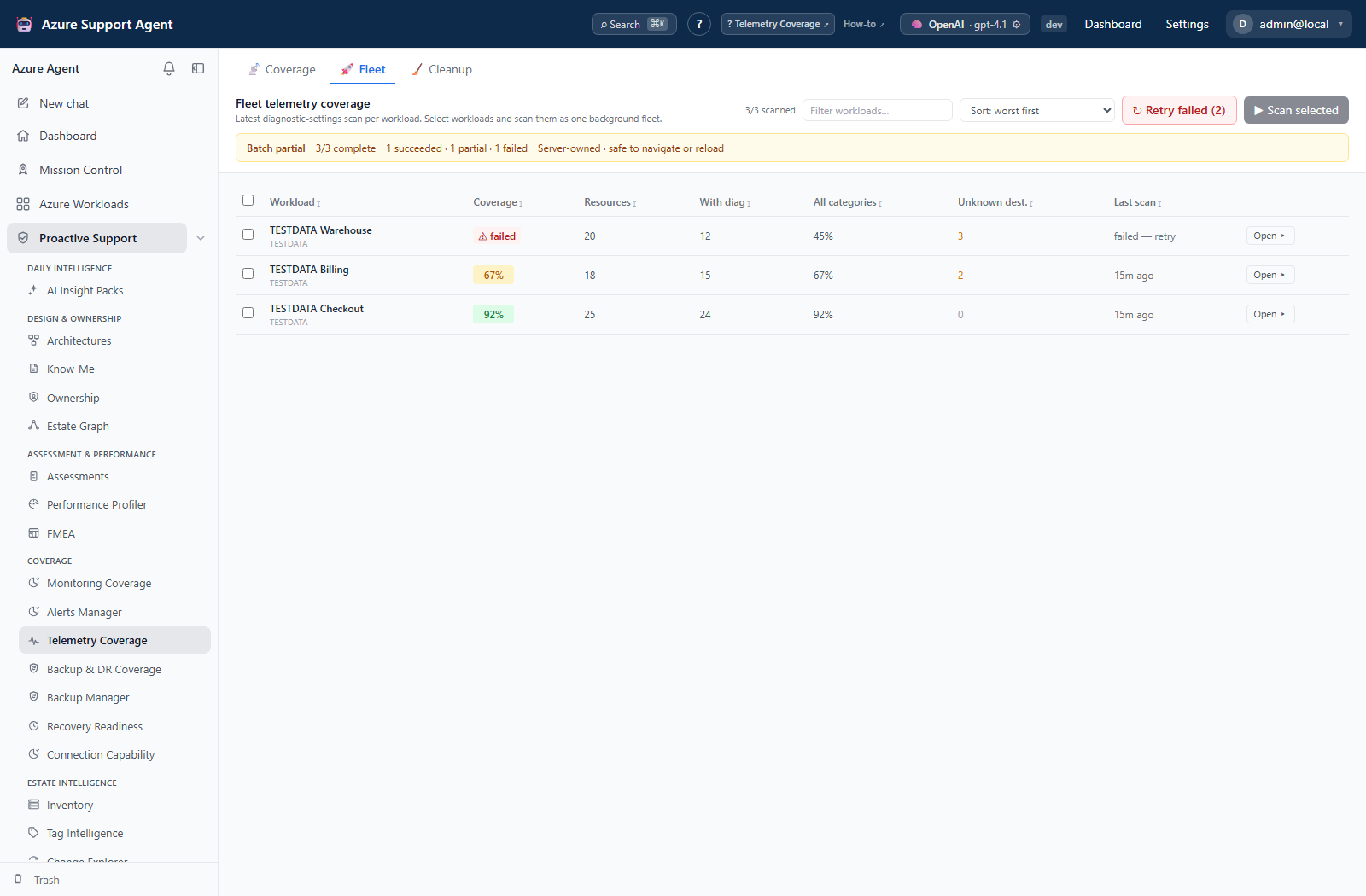
partial | A mix — at least one item succeeded and at least one failed, was partial, or was cancelled. |
failed | Every item failed. |
cancelled | Items were cancelled before starting. |
partial is the state that matters most operationally. It is not a soft success: it means the run’s coverage is incomplete, and the feature’s headline number is built from fewer workloads than you asked for.
Permissions
The batch router does not carry a permission of its own. It resolves one from the feature named in the request:
| Feature | Required permission |
|---|---|
assessment | assessments.run |
changeexplorer | changeexplorer.read |
coverage_amba, coverage_telemetry, coverage_backupdr | coverage.read |
backup_manager | backup_manager.read |
architecture | architectures.write |
mission | missions.run |
inventory_cost | inventory.read |
nightly | settings.write |
deep_review | None — see below |
deep_review is the single exception. A deep-review batch is created by a chat rather than by a feature, and it is authorised by the chat session that owns it, so the router applies no additional feature permission. Any authenticated user can therefore create one. Every other batch requires its feature’s permission, or administrator status.
This is the “generic work-batch router” exception noted in the permissions reference. Batches remain tenant scoped in all cases.
Restart and resumption
The queued tail lives in the database, not in the browser session. After an application restart:
- Items that already reached a terminal state keep it.
- The item interrupted mid-flight returns to queued and its attempt count increases when it reruns.
- Remaining items continue in their original order.
- No duplicate assessment, mission, architecture, chat, or change-analysis result is created.
That last point rests on tenant-scoped idempotency keys, which also stop a double-submitted start from creating a second batch.
Cancel and retry
Cancel pending stops items that have not started; the item currently executing is allowed to finish at a safe checkpoint rather than being killed mid-write. Retry failed/partial is available once the batch is terminal and creates a new idempotent batch containing only the failed, partial, and cancelled items — the original batch is left intact as the record of what happened.
Transient Azure conditions — throttling, timeouts, connection resets, and transient 5xx — are retried automatically with bounded backoff before an item is allowed to become terminal.
Concurrency
Worker width is established at application startup from the general settings. Changing it does not affect a batch already in flight, and it does not take effect until the application restarts. Batches also queue behind one another per tenant/connection lane, so a batch sitting in queued is frequently waiting on an earlier batch’s slot rather than failing.
Safety and limitations
- The worker writes application state, not Azure. It updates control records and feature caches and history. Coverage and analysis collectors remain read-only against Azure; Backup Manager mutations keep their own approval gates regardless of being run through a batch.
- A failed newest attempt never overwrites the last trusted snapshot. The feature continues to show its last good result rather than an empty one.
- Deleting a batch is allowed only when it is terminal, and removes the control record only. The feature’s native history remains in that feature’s own History or Cleanup view.
- A
partialbatch is a coverage statement. Treat any score or gap count derived from it as computed over the items that actually completed.
Troubleshooting
| Symptom | Resolution |
|---|---|
Batch stays queued | Another batch holds the tenant/connection lane. Wait for its slot, or cancel the earlier batch. |
| Items retry by themselves | Expected for Azure 429, timeout, connection reset, and transient 5xx, under bounded backoff. |
Batch finished partial | Open the failed items, resolve the connection, permission, or provider cause, then use Retry failed/partial. |
| Worker width change had no effect | Width is fixed at startup. Restart the application, then confirm the batch retains its ID and reaches a terminal state. |
| Batch cannot be deleted | Deletion requires a terminal state. Cancel it first and let the active item finish. |
| A batch appears to have vanished after restart | Confirm before creating a replacement. Only create a new batch once the original is confirmed missing or terminal. |