Work the IAM scanner inbox
Prerequisites
- Product permission
iam.readto view findings and scanner cards and to run a scanner.iam.writeto change a finding’s workflow state. - A completed access collection for the selected connection. Every check is evaluated against the cached snapshot; running a scanner never triggers an Azure call.
- An approved external process for anything you decide to change. Nothing on either tab writes to Azure.
Route
/iam/scanners and /iam/findings.
Screenshot notes: These synthetic browser fixtures show saved scanner and finding states, not live collection or backend check results. Names and counts are examples, not the shipped scanner catalog or default configuration. No run control or finding-state change was invoked for the captures.
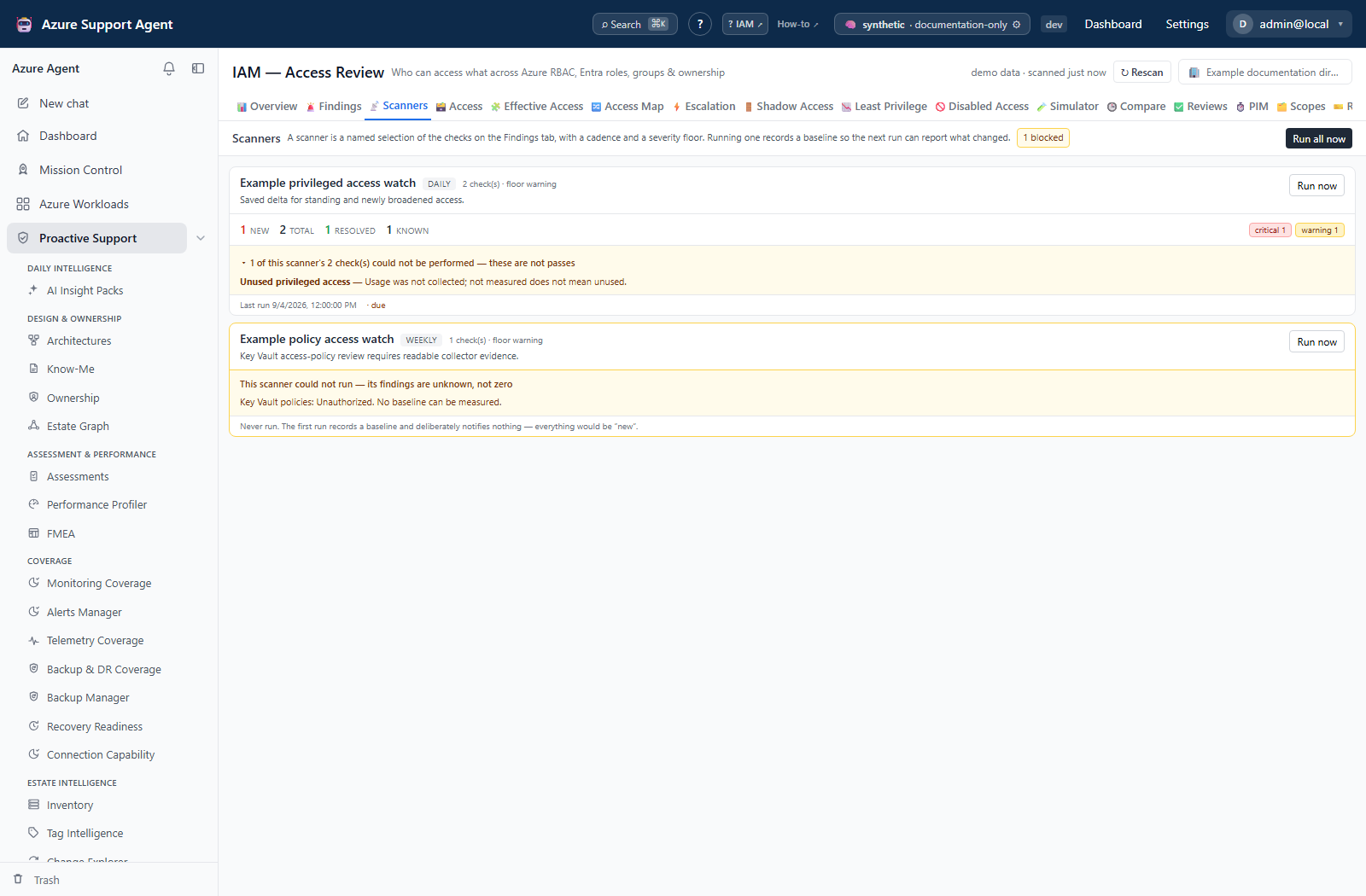
How to read a scanner card without mistaking a quiet day for a clean tenant
- Open
/iam/scanners. Check the header freshness first — a scanner run against a stale snapshot produces a delta about stale data. - For each card, read
newandtotaltogether.newis what appeared since that scanner last ran;totalis the open backlog it is reporting right now. - Treat
new 0beside a largetotalas nothing changed, not as nothing is wrong. The backlog is thetotal, and it lives on the Findings tab. - Check for an amber panel. A card that reads this scanner could not run — its findings are unknown, not zero has published no counts at all, because every check it selects came back unmeasured. Fix the listed cause before believing anything else about that pillar.
- Expand the line reading N of this scanner’s M check(s) could not be performed if it is present. A count drawn from three of eight checks is a different fact from one drawn from eight of eight.
- Note the cadence and the
duemarker. Cadence is a scheduler hint, not a cron: daily means at least a day has elapsed, and a scanner that has never run is always due.
Expected result: For each scanner, a clear reading of what is new, what is outstanding, and what could not be checked.
Verification: Cross-check one card’s total against /iam/findings filtered to that scanner’s pillar and severity floor. The numbers should agree for the same snapshot.
How to run a scanner and record a baseline
- Refresh the access snapshot first if the header freshness is amber or red. Use ↻ Rescan in the page header.
- On
/iam/scanners, use Run now on a single card, or Run all now to run every scanner. - Read the confirmation. It states that the baseline was recorded and that the counts now describe changes since that run.
- On a card that has never run, expect the first-run notice: the first run records a baseline and deliberately notifies nothing, because everything would be new.
- Check the notification center for what was delivered — new findings as one digest per scanner, resolutions as a single informational line, and anything on the always-immediate list published on its own.
Expected result: A recorded baseline, and a delivered delta for anything that changed.
Verification: Re-open /iam/scanners. new on the card you ran is now zero and known has absorbed those fingerprints. total is unchanged, because running a scanner does not resolve anything.
Reading the tab never records a run — the cards are computed without persisting. Only Run now and Run all now move a baseline. If a colleague’s new count has dropped to zero unexpectedly, somebody ran the scanner; nobody caused it by looking.
How to work the findings inbox
- Open
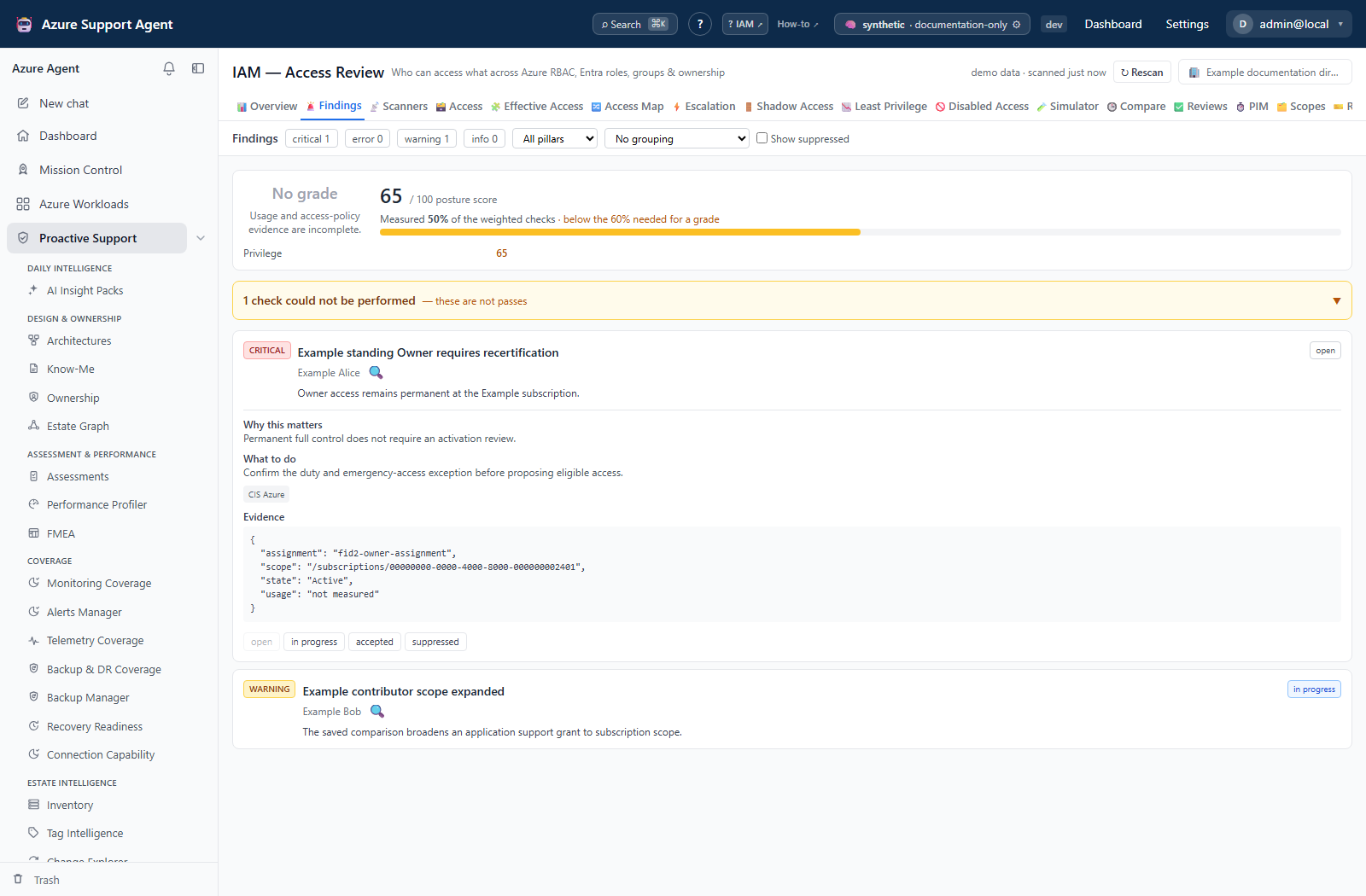
/iam/findings. Read the score card’s coverage percentage before the list. A short list on a tenant with half its checks unmeasured is a coverage problem, not a clean result. - Expand the N checks could not be performed panel and read what is missing. These are not passes.
- Leave the grouping at Group by severity and then by check, both of which are the defaults. The collapsed section headers are the summary — how many criticals, how many errors, worst first.
- Open the critical section and work it. A section header count is a server tally over the whole filtered set; a
showing Nmarker beside it means the page could not carry the whole group. - Expand a finding for why it matters, what to do, its framework references and its raw evidence. Follow the investigate affordance where the affected object is a resolvable principal.
- Verify the claim against Azure or Entra before acting on it.
- Record a state:
in_progresswhile work is underway,acceptedfor owned risk, orsuppressedfor an irrelevant finding. The current UI has no reason field and submits an empty reason. Preserve the rationale externally or through the API’s optionalreasonfield; neither acceptance nor suppression changes the raw scanner result or IAM score.
Expected result: A triaged list where every finding you have looked at carries a state, and where the unmeasured checks are known rather than assumed to be passes.
Verification: Re-collect affected access before rerunning the scanner. A disappeared fingerprint is a computed resolution, not proof of cloud revocation: confirm that its input collectors still succeeded. Suppressed findings keep local state while the detector may continue reporting them.
How to find the checks that were never measured
- On
/iam/findings, set the grouping to Group by pillar. - Scroll to the sections carrying a note instead of a count.
not measured — the inputs for these checks were not collectedandnot built — no check exists for this pillar yetare both rendered as notes, never as a zero. - For each
not measuredpillar, open/iam/diagnosticsand find the collectors that could not read for the relevant scopes. - Fix the permission, license or connectivity cause, rescan, and re-check the pillar.
Expected result: A list of pillars that produced nothing because they could not be measured, separated from pillars that were checked and came back clean.
Verification: After a successful re-collection the pillar appears with a real count, or with a genuine zero and a measured state on the score card.
Safety and rollback
Both tabs are read-only with respect to Azure. Running a scanner writes only this product’s own baseline ledger; changing a finding’s state writes only this product’s own workflow record. Neither can be rolled back through Azure because neither touched it.
A recorded baseline cannot be un-recorded. If a scanner was run prematurely, the delta for that period is lost; the open backlog on the Findings tab is unaffected, and total remains correct.
Suppressing or accepting a finding hides it from the default list for everybody using this connection. Record a reason so the decision is auditable, and review suppressions periodically — they survive re-evaluation by design.
Troubleshooting
| Symptom | Resolution |
|---|---|
| A scanner card shows no numbers, only an amber panel | Every check it selects was unmeasured, so its counts are withheld rather than published as zero. Read the reasons, fix the collection or consent gap, rescan, then run the scanner. |
new is 0 but total is large | The delta is measured against that scanner’s previous run. Nothing has appeared since. Work the backlog on /iam/findings. |
Everyone’s new dropped to zero and nobody remembers running anything | Somebody used Run now or Run all now. Viewing the tab does not record a run. |
| A finding I fixed still appears | Re-collect the access snapshot first. Findings are computed from the cache, so a fix made in Azure is invisible until the next collection. |
| A finding reappeared after being resolved | Its fingerprint started appearing again. Resolution is computed from a fingerprint that stopped appearing, so this is a genuine recurrence. |
| A suppressed finding is visible | Show suppressed is ticked, or the underlying condition changed enough to produce a different fingerprint. |
| The score card says “No grade” | Coverage is below the floor a grade requires. The card states the reason; increase coverage rather than reading it as a bad score. |
| Section counts do not match the number of cards on screen | The header is a server tally over the whole filtered set; the cards are one page. The showing N marker states the difference. |
A sub-section count reads N shown | Sub-section counts are page counts, and are labeled whenever the parent section was truncated. Narrow the filter so the section is complete. |
Severity chips read — | The query has not resolved. That is deliberately not a zero. |
| Changing a state returns a permission error | State changes require iam.write. Viewing and running scanners require only iam.read. |