Entra: privileged access
Product permissions: entra.read for native privileged views and activation action reads; entra.admin for native refresh. Embedded JIT hygiene uses identity.read for both viewing and its independent refresh. Investigate handoffs additionally need investigate.read, with investigate.activity for behavioral history there.
Purpose
App route: /entra/privileged
Privileged access answers who can do what in the directory, whether that power is permanent or has to be switched on, what the tenant requires before it can be switched on, who actually switched it on, and what they did while it was on. It reads the Entra snapshot and — where an Azure RBAC scan exists — joins it with Azure control-plane power for the same principal. Nothing here activates, assigns, or removes a role.
Prerequisites and data sources
entra.readto view;entra.adminto refresh. No write action on this tab touches the directory.- Consent tier 1 (
Directory.Read.All,RoleManagement.Read.Directory) for role definitions and assignments. Without it the whole tab is blind. - Consent tier 3 for PIM depth:
PrivilegedAccess.Read.AzureADandRoleAssignmentSchedule.Read.Directoryfor eligibility, permanence and activation history;RoleManagementPolicy.Read.Directoryfor the per-role activation policy;PrivilegedAccess.Read.AzureADGroupfor PIM for groups. - Entra ID P2. PIM does not exist below P2. On a P1 tenant the PIM domain reports
unlicensed, permanence cannot be resolved, and there is no eligibility or activation data to read. - Activation history and PIM configuration are separate.
RoleManagementPolicy.Read.Directoryfills policy configuration; schedule instances useRoleManagement.Read.Directory, and read-only justification comes from the PIM audit log underAuditLog.Read.All. The app-only request endpoint can reject read-only scopes; do not add write consent just to obtain history. - A completed IAM scan supplies the cached Cross-plane join. Separately, the Entra activation collector reads Azure PIM schedule requests live across visible subscriptions during refresh; it does not obtain those sessions from the IAM cache. Azure Reader may not cover the required PIM reads: inspect the named subscription failures and use approved least-privilege rights.
See Entra setup and coverage for the full scope list and the coverage states.
Tabs and actions
| Sub-tab | What it answers |
|---|---|
| Overview | Headline privilege counts, the Azure-link state, and the privileged-access findings for this snapshot |
| Assignments | Every role assignment with its permanence, its path, its tier, and when it was last activated |
| PIM config | Per privileged role, what activation actually requires |
| Activations | Merged Entra and Azure activation sessions, with a drawer for what each principal did |
| JIT hygiene | Privilege meant to be just-in-time that quietly became permanent, and eligible roles nobody activates |
| Cross-plane | Directory power beside Azure control-plane power, one row per principal |
Overview shows six counts: global admins, privileged principals, standing privileged assignments, eligible assignments, PIM policies fully configured as a fraction of all PIM policies, and cross-plane principals. Global admins are toned as a problem when there are more than five or fewer than two. A banner states either that cross-plane analysis is unavailable and why, or that the Azure RBAC cache is older than the Entra snapshot and the join is indicative rather than current.
Assignments filters by kind — standing, eligible, or all — and by a free-text search over principal name, UPN, and role name. The API additionally accepts a tier and a principal_type filter. Columns are principal, principal type, role, tier, kind, permanence, and last activation. kind distinguishes active, group-derived (annotated with the group it came through), and eligible. Permanence reads yes, time-bound, or unknown; when PIM schedule data was unavailable the grid says so in a banner rather than guessing, because an active assignment and a live activation are indistinguishable without it.
PIM config lists privileged roles worst-configured first with a score out of 100 and one column per activation control: MFA on activation (satisfied by an authentication context), approval, justification, ticket, bounded duration (treated as satisfied at eight hours or less), notifications, and the raw maximum activation duration. If no policies were collected the tab reports the PIM domain state — unlicensed, blind, or genuinely clean — instead of an empty grid.
Activations merges what the current snapshot can see with a durable local ledger. Six tiles — sessions, Entra ID, Azure, tier-0, out of hours, no reason given — double as filters, alongside a search over person, role, scope and reason, a plane selector (both, Entra ID, Azure resources), a tier selector (any, tier-0, tier-1), and a window of 7, 30, 90 days or everything recorded. The browser sends its own UTC offset so the working-day judgment is made in tenant-local time; the endpoint takes that offset plus a business-hours start and end hour, and returns facets for plane, tier-0, out-of-hours, missing and weak justification, activations granted by someone other than the requestor, and distinct principals. Selecting a session opens a drawer with its start, end, granted duration, outcome and stated reason.
Below the filters, an activation window bins every loaded session across the real span it covers, with tier-0 stacked in red. Drag either handle, click a column, or use the relative presets to brush a sub-window; the table follows it. The brush is a client-side slice of what was already returned, so it costs no round trip — widening past the loaded range is what the days selector above is for. Changing any filter clears the brush rather than silently hiding rows from the new result set.
Selecting what they did opens the drawer and immediately requests action enrichment for that session. It reads directory audit events for the window plus a two-minute pad; an Azure activation additionally reads its own subscription’s Activity Log. Results are cached for up to 500 session keys and require refresh=true through the API to bypass an existing result. The normal drawer does not automatically expire an open-session result.
Attribution is coarse: it checks for any standing privileged directory role or powerful Azure role, not whether that role authorized each particular action at the historical instant. required_activation and possible_without are leads, not causal proof. unclassified applies when the Azure join is unavailable; always inspect collection notes before interpreting an empty action list as unused privilege.
Two further datasets are served by the API without a control on this tab. GET /api/entra/privileged/activations-export returns an evidence pack: every session in the window with the ledger timestamps and a provenance block naming the exact Graph and ARM endpoints each claim came from. GET /api/entra/privileged/principal/{principal_id} returns a per-principal dossier — effective role names, every assignment, recent activations, Azure reach, and the findings raised against that object.
Reading the JIT hygiene examples
These browser fixtures illustrate the JIT hygiene presentation, including example eligibility and activation rows. They are not a computed tenant assessment and do not establish live schedule coverage. Use native PIM config and Activations, with their source notes, to review collected schedule evidence.
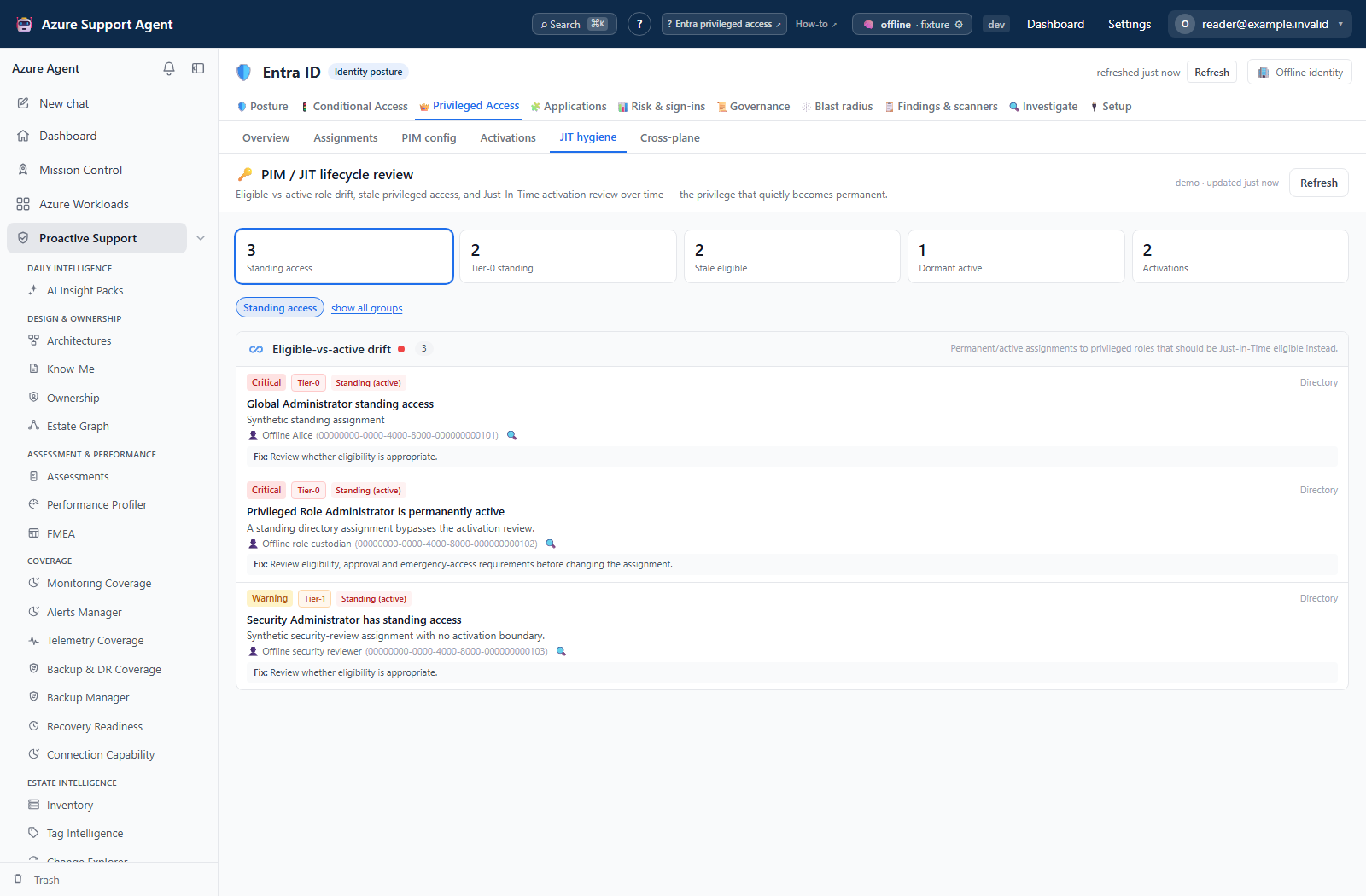
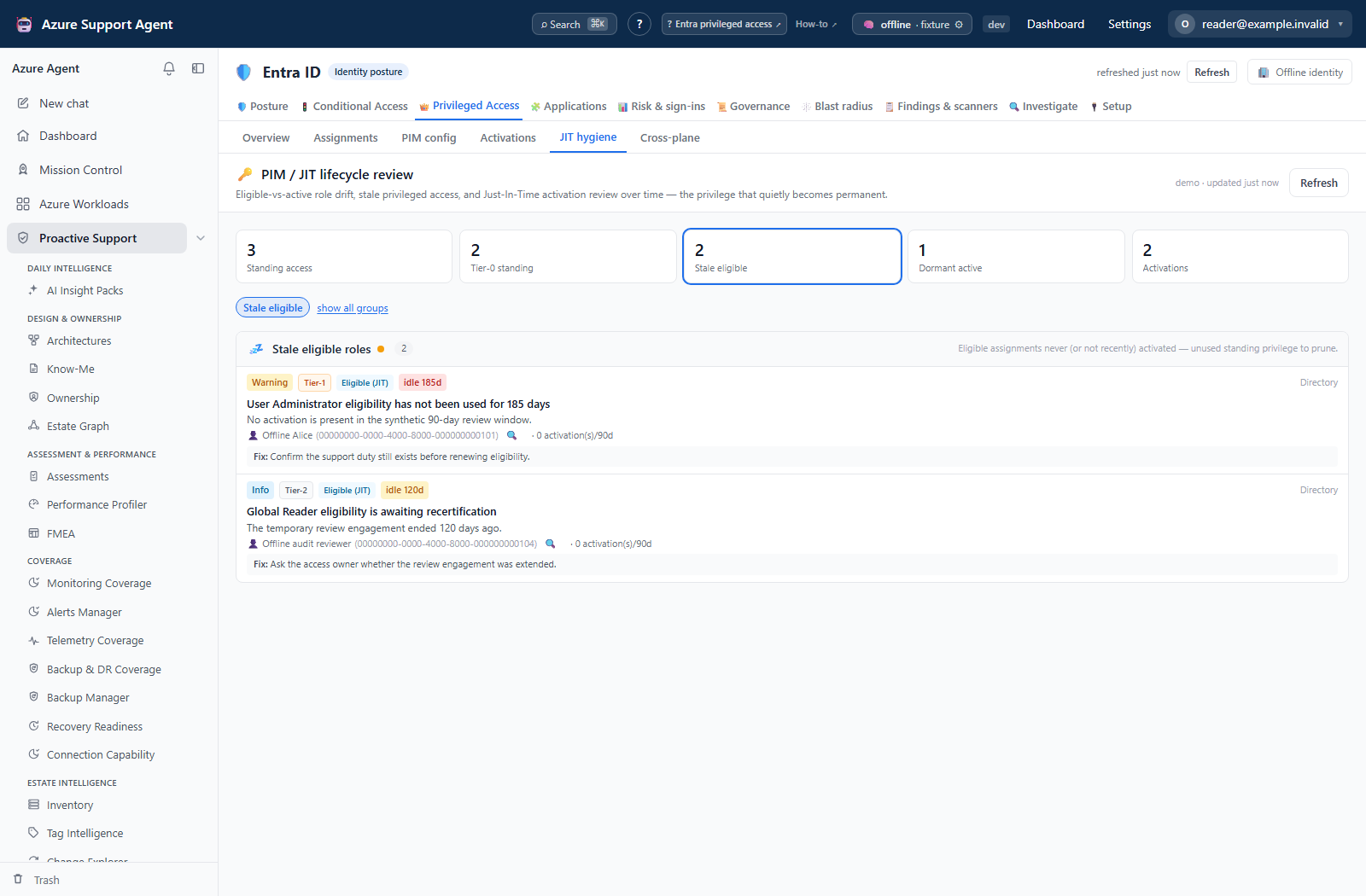
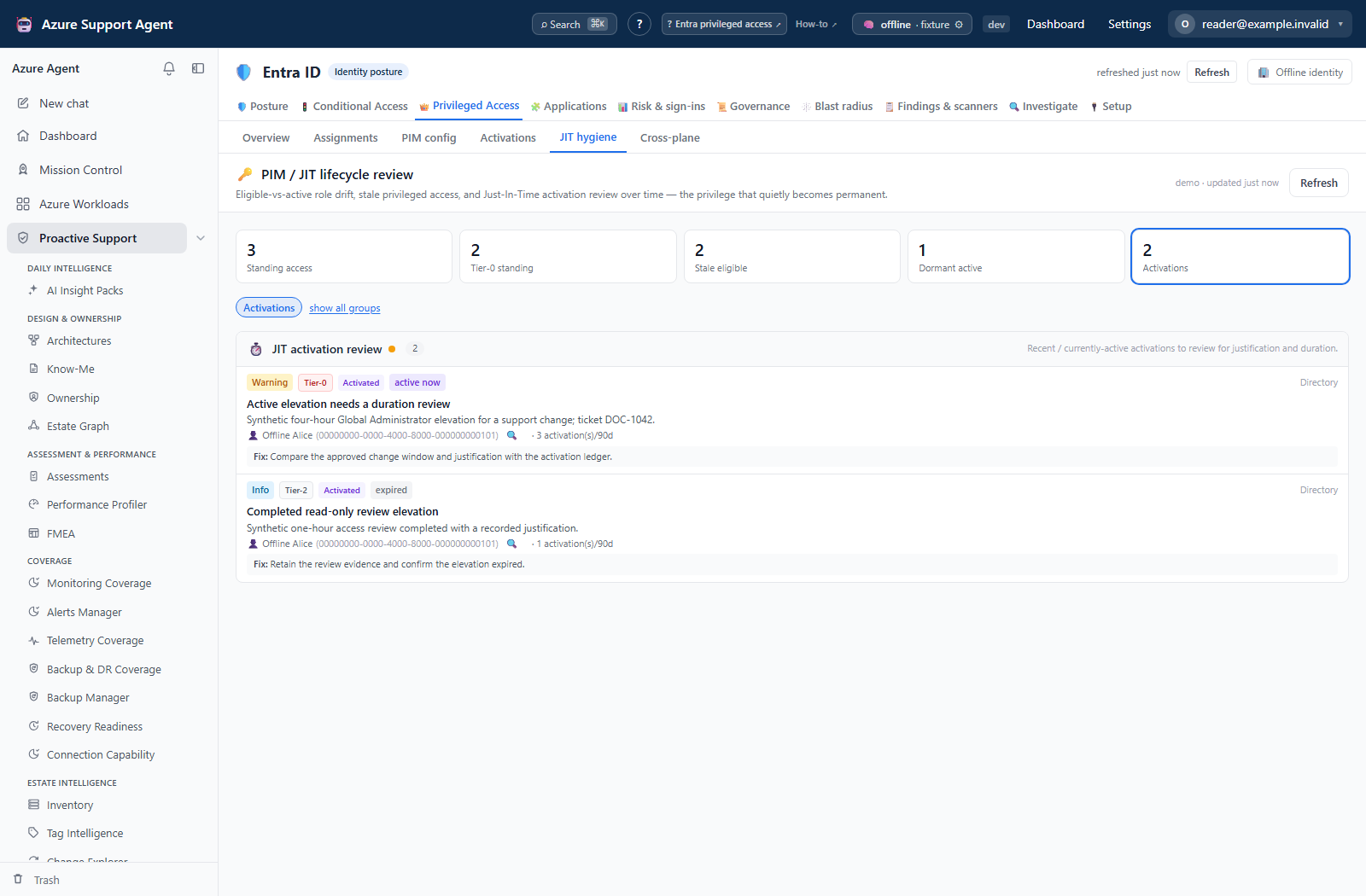
Continue with the illustrated activation-session review to read a native session and its action drawer.
Freshness and scope behavior
One collection builds one snapshot per tenant, and that snapshot serves every Entra tab. Refresh from the freshness badge in the page header. Sub-tabs never collect on their own; opening Assignments or PIM config reads what is already cached.
The activation ledger is the exception to snapshot-only reading. Graph retains directory audit history for about 30 days, so each refresh folds the sessions it can see into an append-only per-tenant record. A session already on record is refined, never duplicated, and history therefore reaches past the retention cliff — but only back to the first collection this product ever ran for the tenant.
Cross-plane comes from the separately refreshed IAM cache and carries its age. Activation sessions come from their own collector and local ledger. The ledger retains at most 100,000 sessions per tenant, trimming oldest entries; it is not unlimited history. Native full refreshes update domains independently, while JIT hygiene requires its own Refresh.
Interpretation of results
- Standing privilege is the finding, not the count. A permanent tier-0 assignment is materially different from an eligible one that is activated twice a month with approval and a ticket. The Assignments grid separates them; the headline count does not.
- Tier is derived from the role name, so tier-0 means a role on the tenant-takeover list, tier-1 a role with broad but bounded power, tier-2 everything else.
- A PIM score of 100 means every control is on, not that the role is safe to hold. A bounded duration with no approval and no MFA still scores partially.
- Out of hours is a question, not a verdict. It is computed from the offset the browser reported and the configured working day; a distributed operations team will generate them legitimately.
- Attribution is deliberately conservative.
possible_withoutdoes not mean nothing happened — it means the elevation was not what made it possible. - Cross-plane rows are the concentration risk. A principal with both directory power and Azure Owner or User Access Administrator is a single point of total compromise, and no Microsoft surface shows that pairing in one place.
Safety and limitations
- Every view is read-only. No role is activated, assigned, extended, or removed, and no PIM policy is changed.
- The ledger and the cached action results are stored locally per tenant and are never written back to Entra.
- Activation history before the first collection cannot be recovered; the ledger starts when you start.
- The action window is padded by two minutes because audit ingestion lags. Actions that landed outside that pad are not shown.
- Azure actions are recovered per subscription and are bounded per session; a very busy window is truncated rather than paged indefinitely.
- Assignments return at most 2,000 rows, activation sessions 500, Cross-plane 1,000 and the API privilege dossier 100 activations. Activation tiles can describe more rows than the loaded table/brush, which has no paging control. Use narrower server filters or the API activation export for retained sessions, not the on-screen subset.
- Exports and dossiers contain identity metadata. Treat them as governance material and do not paste live tenant, object, or user identifiers into tickets or prompts.
Troubleshooting
| Symptom | Check |
|---|---|
Permanence shows unknown for every row | PIM schedule data was not collected. Grant tier 3 and confirm the tenant has Entra ID P2. |
| PIM config grid is empty | Read the state on the empty panel: unlicensed is a license problem, blind is a consent problem. |
| PIM config is populated but activation detail is absent | Check schedule-instance read access and AuditLog.Read.All for PIM audit justification. Do not grant Graph write scopes to bypass the request endpoint’s restriction. |
| Activation list stops about 30 days back | That is Graph retention. The ledger extends it forward from the first collection, not backwards. |
| Cross-plane says unavailable | No Azure RBAC scan exists for this tenant. The banner carries the reason. |
| Cross-plane shows a stale warning | The RBAC cache predates the Entra snapshot. Re-run the RBAC scan for a current join. |
| Out-of-hours counts look wrong | The judgment uses the browser’s UTC offset. Check that the machine’s time zone matches the tenant’s working day. |
| Names appear as raw object IDs | The people collector failed or lacks permission; fix consent and refresh. |
| Refresh returns a permission error | Collection requires entra.admin, not entra.read. |