IAM: insights, scopes, roles and diagnostics
Product permission: iam.read for all four tabs.
Purpose
App routes: /iam/insights — tab label Insights; /iam/scopes — tab label Scopes; /iam/roles — tab label Roles; /iam/diagnostics — tab label Diagnostics
These four are the reference and health tabs. Insights turns the access rows into counted pivots so a reviewer can see the shape of an estate before reading any of it. Scopes and Roles are the reference layers the rest of the screen is composed from. Diagnostics is where we could not look is distinguished from there is nothing there — the distinction every other tab depends on.
Screenshot notes: These synthetic browser fixtures illustrate cached reference data and collector states, not live collection or backend analysis. Example roles, principals, counts and messages are not defaults or evidence about an actual tenant.
Prerequisites and data sources
- Product permission
iam.read. - A cached access snapshot. All four tabs read the cache; only the per-scope refresh buttons on Scopes start a collection.
- Directory collection for the Roles tab — role definitions and resolved principals both come from the cached directory layer, not from a live Graph call.
- The Insights scope tree and the workload list back the filter rail.
Tabs and actions
Insights
Served by GET /api/iam/pivots, which honours the scope and workload filter rail.
Thirteen pivots, each a sorted list of label-and-count rendered as a compact bar list:
| Pivot | What it counts |
|---|---|
| Access by surface | Azure RBAC, Entra ID RBAC, Key Vault access policy, classic admin, deny assignment, Lighthouse delegation |
| Access by role | Rows per role name |
| Access by principal type | User, group, service principal, and so on |
| Access by principal | Rows per effective principal |
| Access by subscription | Rows per subscription |
| Access by scope type | Tenant root, management group, subscription, resource group, resource, directory |
| Privileged roles by principal | Privileged rows only |
| Data-plane roles by resource type | Rows whose role carries data actions |
| Group-derived access by group | Rows inherited through a group, by source group |
| Access by role category | Rows per role category |
| PIM eligible vs active | Two bars |
| Access by path | Direct, group-transitive, owner |
| Privileged access by subscription | Privileged rows only |
The server computes the top entries per pivot and each card renders the leading rows of that, so a pivot is a shape, not a complete enumeration. Do not read the absence of a label from a card as the absence of that access; use the Access grid or the workbook for completeness.
The filter rail has two modes — the Azure scope hierarchy (management group to subscription, each node carrying its own grant count) and the flat workload list. Picking the tree root clears the filter. The rail is shared with the access grid, so the same narrowing applies in both places, and the header states filtered to <name> when one is active. An Excel (all tabs) link carries the active filter into the workbook export.
Pivot counts are over every collected row, including deny assignments, whereas the Overview KPI Total grants deliberately excludes them because a deny removes access. The two therefore will not tie, and should not: the deny surface has its own bar on Access by surface.
Scopes
Served by GET /api/iam/scopes. Every cached scope with its collection status, grant count and freshness, plus a per-scope refresh so one subscription can be re-collected without touching the rest. The directory layer’s own freshness is returned alongside.
Staleness is measured from the more recent of collected and verified. A delta refresh can confirm a scope is unchanged without re-collecting it; if staleness were measured from the collection time alone, every delta-maintained scope would show a stale warning on data known to be current, and readers would be pushed into full refreshes — which is the cost delta refresh exists to avoid. The real collection age is still reported; the tab shows both. The staleness threshold is the configured cache TTL, published on the response.
Roles
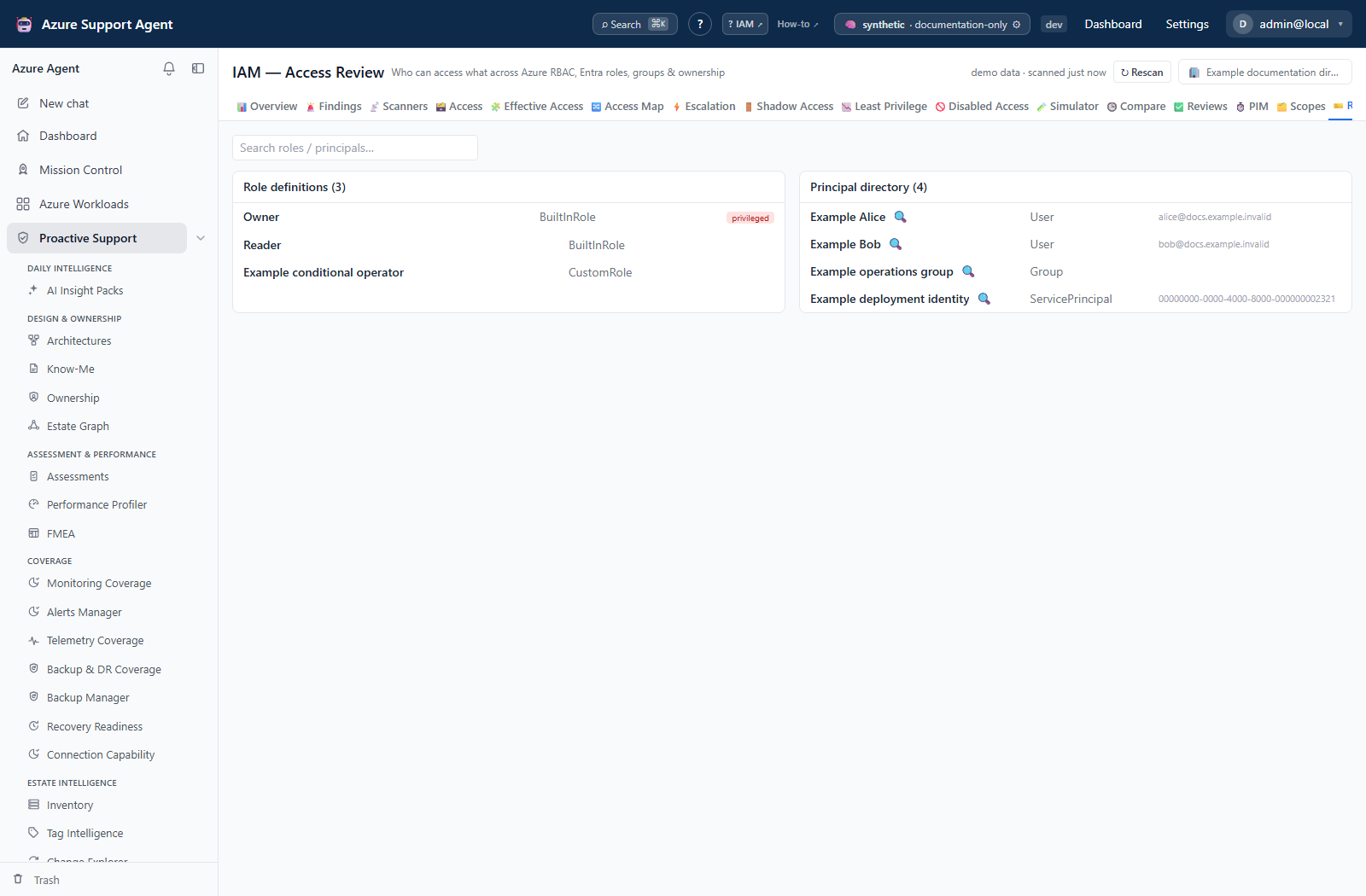
Served by GET /api/iam/roles, which reads the cached directory layer. Two virtualized lists side by side, filtered by one search box:
- Role definitions — role name, role category, and a privileged marker.
- Principal directory — display name, principal type, and the user principal name or application id, with an investigate affordance on resolvable identities.
Each heading states N of M while a search is active, so a filtered list never reads as the whole directory. Search matches anywhere in the record, not only the name.
This is a reference view of what was collected. A role definition missing here is why an evaluation elsewhere returns indeterminate, and a principal missing here is why a grant elsewhere shows an unresolved object id.
Diagnostics
Served by GET /api/iam/diagnostics, with the deny count read from GET /api/iam/overview.
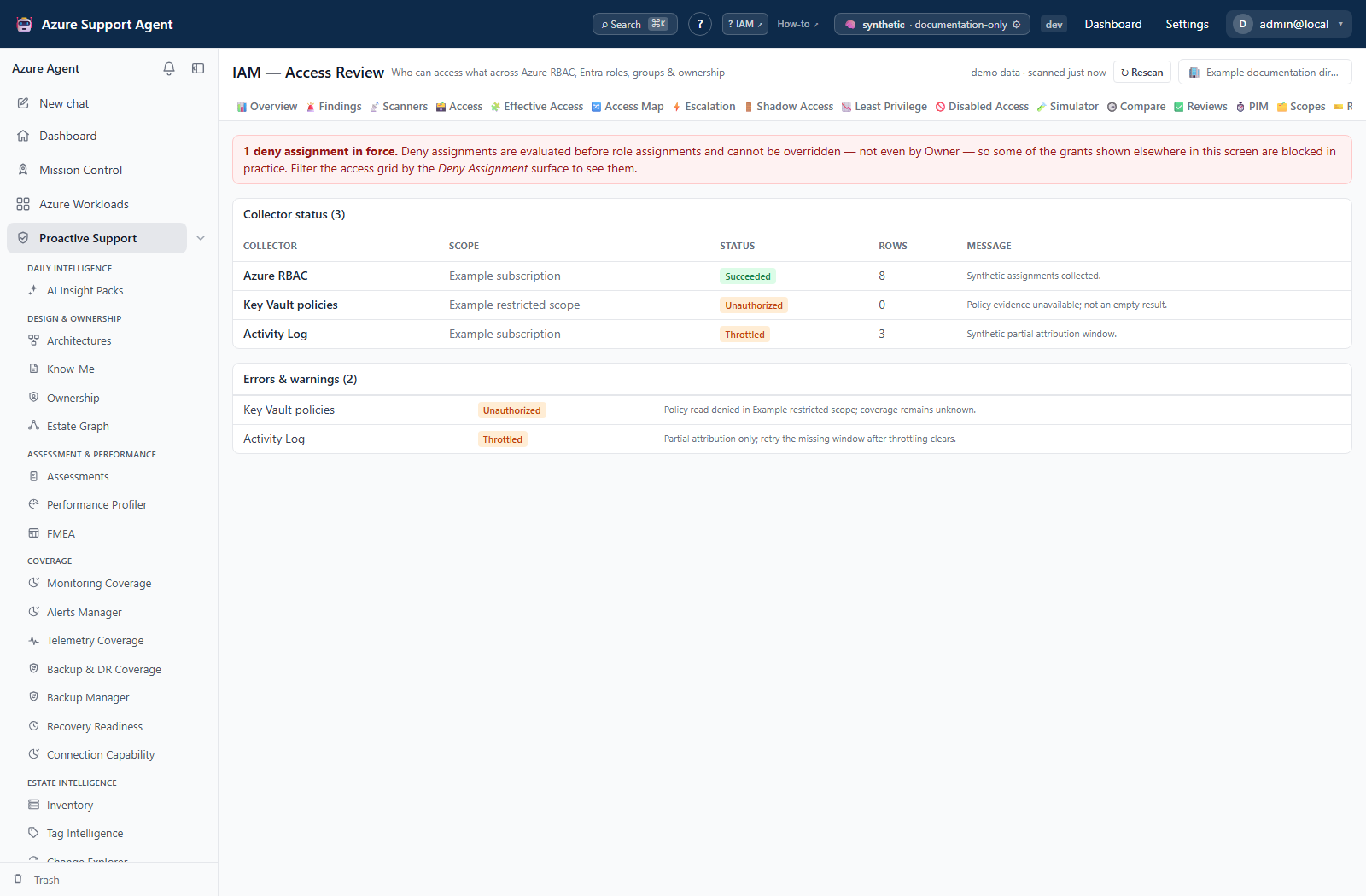
A deny-assignment banner appears whenever the snapshot contains any. Deny assignments are evaluated before role assignments and cannot be overridden — not even by Owner — so some grants shown elsewhere on the screen are blocked in practice. The banner points at the Deny Assignment surface filter on the access grid.
Collector status, one row per collector per scope: the collector, the scope, its status, the rows it added and its message. Seven statuses are used:
| Status | Meaning |
|---|---|
Succeeded | Clean |
SucceededWithWarnings | Rows collected, something alongside them was degraded |
PartiallyCollected | Rows collected, part of the surface was not |
Skipped | Deliberately not attempted |
Unauthorized | Refused — no trustworthy rows |
Throttled | Rate-limited — no trustworthy rows |
Failed | Errored — no trustworthy rows |
The last three are the set that means this scope produced nothing you can rely on. PartiallyCollected is deliberately not in that set: a tenant without the license for PIM endpoints is partial on every scope forever, and treating partial as untrustworthy would make every delta refresh re-collect the whole estate while still reporting that it had done a delta.
Errors and warnings lists every collected row carrying an attention status or an error message, with its collector, status and message.
Freshness and scope behavior
- Insights, Roles and Diagnostics read the cache only. Scopes reads the cache and offers the per-scope refresh buttons.
- Insights honours the scope and workload filter rail. The other three do not; Scopes and Diagnostics are per-scope by construction, and Roles is the tenant’s directory layer.
- The directory layer ages independently of the Azure scope slices. A fresh subscription slice with a stale directory shows current assignments against outdated names and group paths.
- Refreshing the directory does not refresh Azure assignments, and refreshing a scope does not refresh the directory.
Workflow overview
- Open Diagnostics first on any tenant you have not read recently. A collector reporting
Unauthorizedinvalidates everything derived from that scope. - Read the deny-assignment banner if it is present, and note that some access shown elsewhere is blocked in practice.
- Open Scopes and check per-scope freshness. Refresh only what is stale rather than rescanning the estate.
- Open Insights, narrow with the filter rail, and read the shape: which surfaces exist, where privileged access concentrates, how much arrives through groups.
- Use Roles to confirm whether a role definition or a principal was actually collected before concluding that an absence elsewhere is a finding.
- Take a specific candidate to the access grid or to Effective Access.
Interpretation of results
- A pivot card is a top-N shape, not an inventory. An absent label is not evidence of absent access.
- Pivot totals include deny rows; the Overview Total grants KPI does not. They are counting different things on purpose.
Skippedis not a failure and not a pass. It means the collector was deliberately not attempted for that scope.PartiallyCollectedmeans rows arrived and something alongside them did not. Read the message before treating the scope as complete or as blind.- A scope that looks stale by collection time may be current by verification time. Read both; the tab shows both.
- An unresolved principal in the directory is not necessarily a deleted one. It may be inaccessible to Graph, or simply not collected. Confirm before treating an assignment as orphaned.
- A missing role definition is a coverage gap, not a role with no permissions. It is why evaluations elsewhere return
indeterminate.
Exports, history, scheduling, and integrations
- Insights carries an Excel (all tabs) link that passes the active scope and workload filter into
GET /api/iam/export/workbook. The access sheets honour the filter; the analysis sheets are tenant-wide by construction, because a finding about a scope you filtered out is still true and dropping it would make the export read cleaner than the tenant is. GET /api/iam/scope-treebacks the filter rail and the Effective Access scope selector; it is built from the cache and never triggers an Azure call.GET /api/iam/cachereports what derived caches exist, how old they are, how long they took to build, and whether they were built from the current source version. The Escalation tab renders it; there is no dedicated cache screen.GET /api/iam/resource/access-summaryanswers who can reach one resource at all, and is RBAC the only way in and backs the Inventory resource drawer rather than any IAM tab. Inherited access is the substance of that answer — almost nobody is assigned at a resource, they are Owner on the subscription and reach it from there.- Refresh jobs started from Scopes are recorded in the audit log and stream progress; they survive navigation and can be reconnected to.
Safety and limitations
- All four tabs are read-only with respect to Azure. The per-scope refresh buttons on Scopes start a collection, which reads Azure and writes only this product’s cache.
- Insights pivots are bounded lists. Never quote a pivot count as a population figure.
- Collector status is per collector per scope. A scope can be simultaneously fresh for role assignments and blind for PIM, and only Diagnostics shows that split.
- The directory layer is a snapshot. Names, group membership and principal existence can all have moved since it was collected.
- Deny assignments, ABAC conditions, service-native authorization and classic administrators may be partially represented. What was not collected is reported here rather than absorbed silently.
Troubleshooting
| Symptom | Check |
|---|---|
A collector shows Unauthorized | The connection lacks read access at that scope. Nothing derived from that scope is trustworthy — fix the permission and re-collect before reading any other tab for it. |
A collector shows Throttled | Azure rate-limited the collection. Re-run the scope refresh; repeated throttling on a large estate is a reason to refresh scopes individually rather than all at once. |
A collector shows PartiallyCollected on every scope | Commonly a licensing gap — for example PIM endpoints refusing a tenant without the required license. Read the message. Partial means rows arrived; it is not treated as untrustworthy. |
| A scope shows a stale badge but was verified minutes ago | Staleness uses the more recent of collected and verified. If it is still marked stale, neither is inside the TTL. |
| Insights is empty | No access scan has been loaded, or the filter excludes everything. Clear the filter by picking the tree root, then check Diagnostics. |
| A pivot count does not match the Overview KPI | Pivots count every collected row including deny assignments; Total grants excludes denies because a deny removes access. |
| A principal shows as an object id everywhere | It is not in the cached directory. Refresh the directory from Overview and verify Graph consent; if it still does not resolve it may be deleted or invisible to Graph. |
| A role appears in the grid but not in Roles | Its definition was not collected. That is also why evaluations against it return indeterminate. Run a full rescan to re-collect role definitions. |
| The deny-assignment banner is present but no deny rows are visible | Filter the access grid by the Deny Assignment surface. Deny rows are excluded from grant counts elsewhere by design. |
| A refresh started from Scopes appears to stop when navigating away | It does not — the job runs in the background and is reconnected to on return. Progress is streamed while the page is open. |