Debug private DNS resolution
Screenshot note: The native DNS form and result columns use synthetic browser-only inputs and saved results. No live DNS resolution, SSH command, Azure zone read, or AI call occurred. The displayed private/NXDOMAIN answers are modeled examples; unknown zone facts must not be read as a verified DNS misconfiguration.
Prerequisites
- Product permission
netdiag.run. - At least one onboarded Sandbox VM in the network whose resolution you want to test. See Manage Sandbox VMs.
- Sandbox tooling enabled by an administrator.
- For zone facts, an Azure connection able to read Private DNS zones and their virtual-network links.
- The FQDN in question, and ideally the resource ID of the VNet the client sits in.
Route
- Open
/architectures/:idand right-click a node, or open/inventoryand use the action on a private endpoint or a private-endpoint-eligible resource.
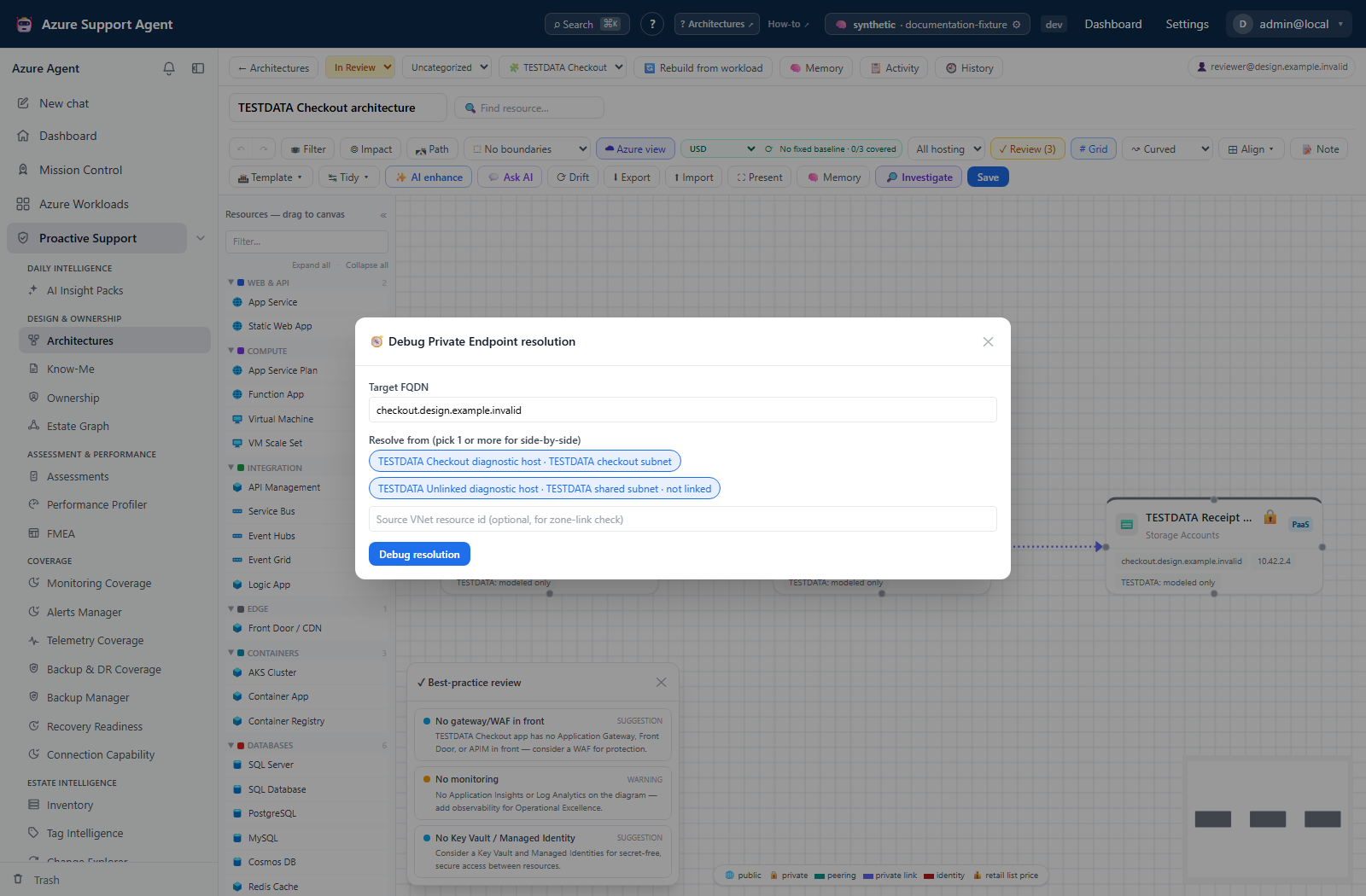
How to resolve a name from inside the network
- Choose 🧭 Debug resolution. From a canvas node the FQDN is pre-filled from node metadata; from Inventory it is taken from the resource name.
- Confirm or correct the target FQDN, for example the
privatelink-backed hostname of a storage account or Key Vault. - Select one or more source VMs. Selecting several resolves the same name from each, side by side.
- Optionally enter the source VNet resource ID. This is what allows the zone-link check to be conclusive rather than indicative.
- Start the run and watch each source stream its chain: effective DNS servers, resolver, resolution, CNAME chain, hosts-file overrides, classification, and gate check.
- Read each source’s classification —
private,public, ornxdomain— and the resolved IP.
Expected result: Per-source resolution with a named root cause, plus an overall classification for the run.
Verification: Confirm the sources listed are the networks you meant to test. A result from an unlinked VM describes that VM’s network, not the client’s.
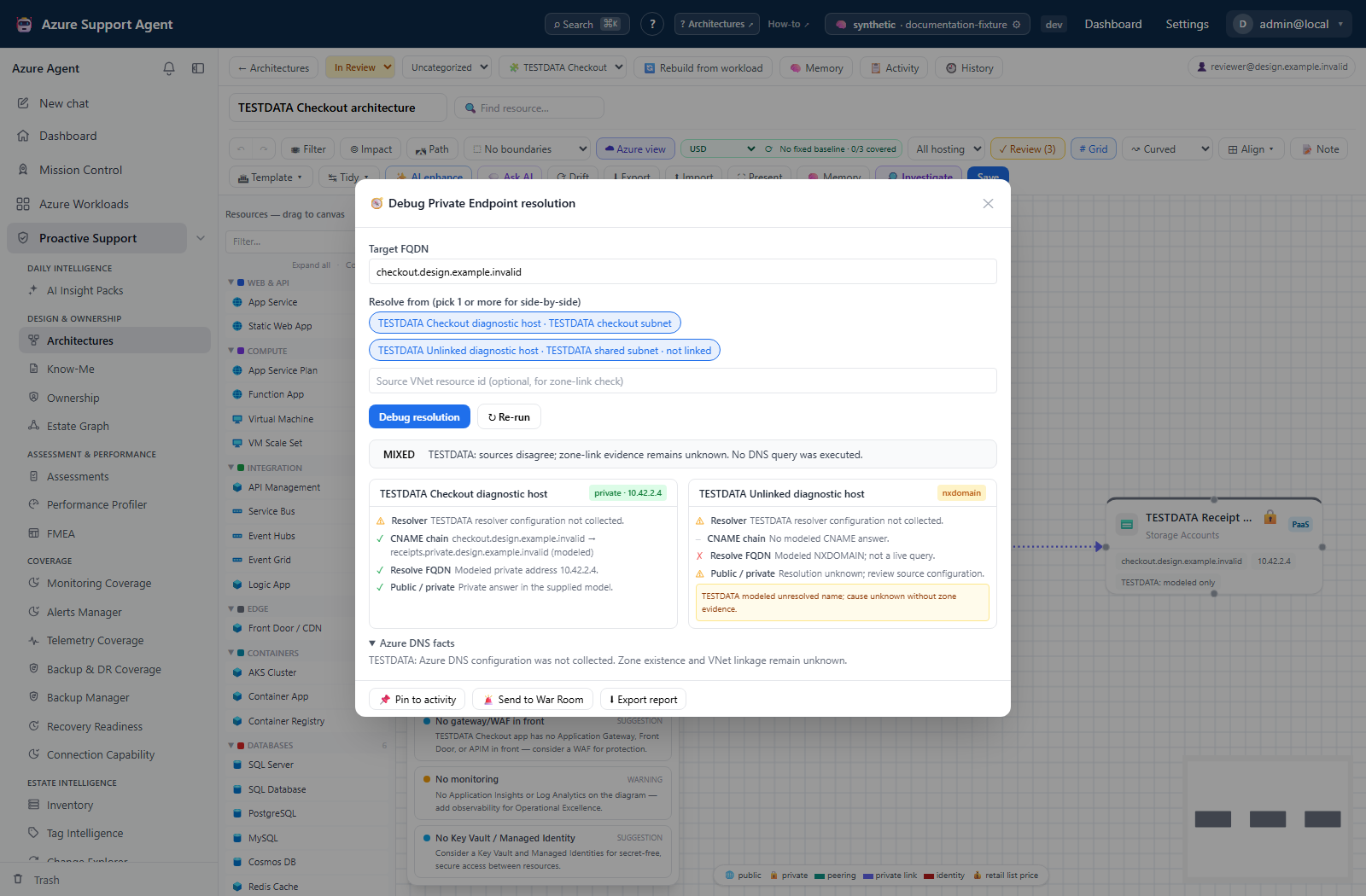
How to identify the root cause
-
Read the run’s
misconfig_kind:Value Meaning Typical fix (empty) Resolved to the expected private address. None. missing_zoneThe expected privatelink.*zone does not exist.Create the zone. missing_linkThe zone exists but is not linked to the source VNet. Add the virtual-network link. custom_dns_overrideA custom DNS server answers ahead of Azure-provided resolution. Correct the forwarder or conditional forwarding rule. public_unknownResolved publicly; the private path could not be confirmed. Confirm the private endpoint and zone before concluding. no_resolutionThe name did not resolve at all. Check the record and the resolver. - Open the zone facts panel and compare Azure’s truth — expected zone, whether it exists, whether it is linked to the source VNet, and the A-record IP — against what the VM actually resolved.
- Where sources disagree, compare their effective DNS servers. Disagreement between two sources is a finding, not an error.
Expected result: A specific cause rather than “DNS is wrong”.
Verification: Zone facts are only conclusive when the Azure read succeeded. If the panel reports itself unavailable, treat the classification as based on the probe alone.
How to generate and apply the corrective Bicep
- On a run with an identified misconfiguration, choose Generate IaC.
- Review the generated Bicep for the private DNS zone and link configuration.
- Apply it through your own change process. The application does not deploy it.
- Re-run the resolution with the same FQDN and sources, and confirm the classification moved to
private.
Expected result: Reviewed Bicep applied by your normal pipeline, and a follow-up run that proves the fix.
Verification: Do not treat generation as remediation. The only evidence the problem is fixed is a subsequent run that resolves privately from the affected source.
How to preserve the result as evidence
- Use the report export to download a Markdown record of the run.
- Use Pin to attach the run to the architecture’s activity feed, optionally routing it to the War Room.
Expected result: A durable record of what resolved to what, from where, and when.
Verification: Confirm the pinned entry references the intended run.
Safety and rollback
The debugger performs no Azure writes, so there is nothing to roll back from running it. The rollback risk sits entirely with the generated Bicep: it is a proposal produced from one run’s findings, it has not been validated against your environment, and applying private DNS changes affects every client in the linked VNet, not only the host you tested. Review it, stage it, and keep the prior zone configuration recoverable.
Resolution runs execute on a host inside your network under the sandbox VM’s account, so the boundaries in Sandbox VM diagnostics apply. A demo seed is available for reviewing the workflow without a live VM; seeded runs are marked demo and say nothing about the real estate.
Troubleshooting
| Symptom | Resolution |
|---|---|
| “No sandbox VM onboarded” | Register one at /admin/sandboxvms, ideally in the VNet whose resolution you are testing. |
| Warning that no VM is linked to this architecture’s workload | All sandbox VMs are being offered. Pick one whose network is actually relevant. |
| Zone facts unavailable | The Azure connection could not read Private DNS zones or links, or command execution is disabled. The per-source classification still stands. |
public_unknown on a resource you believe has a private endpoint | The private path could not be confirmed. Verify the private endpoint exists and that the FQDN maps to a privatelink zone. |
custom_dns_override reported | A custom resolver is answering first. Fix the forwarder rather than the zone. |
| Two sources return different IPs | Expected with split-horizon or per-VNet resolvers. Compare their effective DNS servers to find which is wrong. |
| Generated Bicep looks incomplete | It addresses the identified misconfiguration only. Review it as a proposal and complete it for your environment. |
| Run resolves correctly but the application still fails | Name resolution is one layer. Test the path with Test connectivity. |