Entra: applications and consent
Product permissions: entra.read for Inventory/Consent; entra.admin for native collection and sign-in Read now. The embedded Application Registrations panel, its refresh/cancel and its separate workbook require identity.read in addition to access to the Entra shell.
Purpose
App route: /entra/applications
Applications answers which non-human identities exist in the tenant, what they have actually been granted, who is accountable for them, when their credentials expire, and what the tenant’s consent settings allow users to hand out unsupervised. The distinction the whole screen is built around is requested versus granted: a manifest entry is what an application asks for, an app-role assignment is what it holds. Only the granted set is risk, and the two are never conflated.
Prerequisites and data sources
entra.readto view;entra.adminto refresh. Nothing on this tab writes to the directory.- Consent tier 1:
Application.Read.AllandDirectory.Read.Allfor registrations, service principals, owners, credentials and granted app-role assignments. Without these the tab is blind. - Consent tier 2:
Policy.Read.PermissionGrantfor the consent posture and permission-grant policies, andSynchronization.Read.Allfor provisioning jobs. Missing either narrows the Consent sub-tab rather than emptying the grid. - No Entra ID P1 or P2 license is required for the application inventory itself. Conditional Access relevance on the detail view depends on the Conditional Access collection, which does need P1.
- An Azure ARM connection with a completed RBAC scan for the Azure reach block. It reads the existing RBAC cache and starts no new Azure collection.
Permission names and their risk tiers are resolved from the live Microsoft Graph service principal rather than a hard-coded list, so a new permission is named automatically and an unrecognized identifier is reported as unknown rather than silently dropped.
Tabs and actions
| Sub-tab | What it answers |
|---|---|
| Inventory | Every application and enterprise application, ranked by risk, with the detail drawer |
| Consent | What the tenant lets users consent to, and every tenant-wide delegated grant |
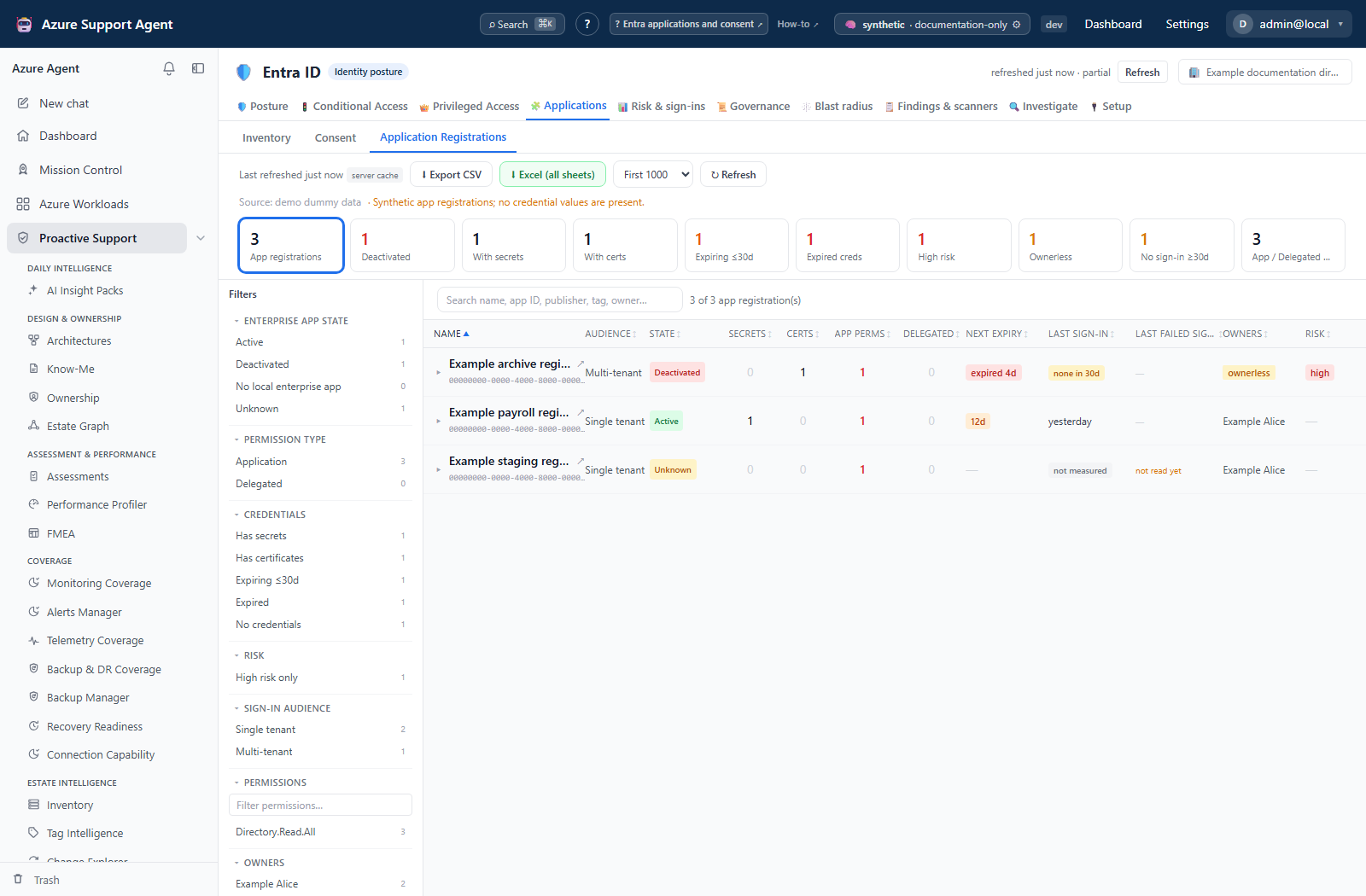
| Registrations | Credential expiry hygiene for app registrations — the operational view rather than the risk view |
Inventory is one grid over both planes of the same object: local app registrations joined to their service principal, plus enterprise applications that have no local registration, which are third-party apps someone consented into the tenant. Microsoft first-party service principals are excluded. Filters are a free-text search over display name and application ID, an Ownerless only toggle, and a Risk ≥ threshold; the API additionally accepts a maximum-permission-tier filter and offset/limit paging, defaulting to 200 rows and capped at 2000. Rows sort by risk descending, then by name. Columns are risk, application, permissions, credentials, owners, and assigned principals. Inline markers call out Azure-managed identities, enterprise-app-only entries, orphaned service principals, multi-tenant registrations, external publishers, self-grant capability, and tenant-wide content access.
Screenshot notes: These synthetic browser fixtures illustrate reading the panels, not a live collection or backend risk calculation. Example risk components, weights, counts and settings are not product defaults; use the model and refresh limits documented here.
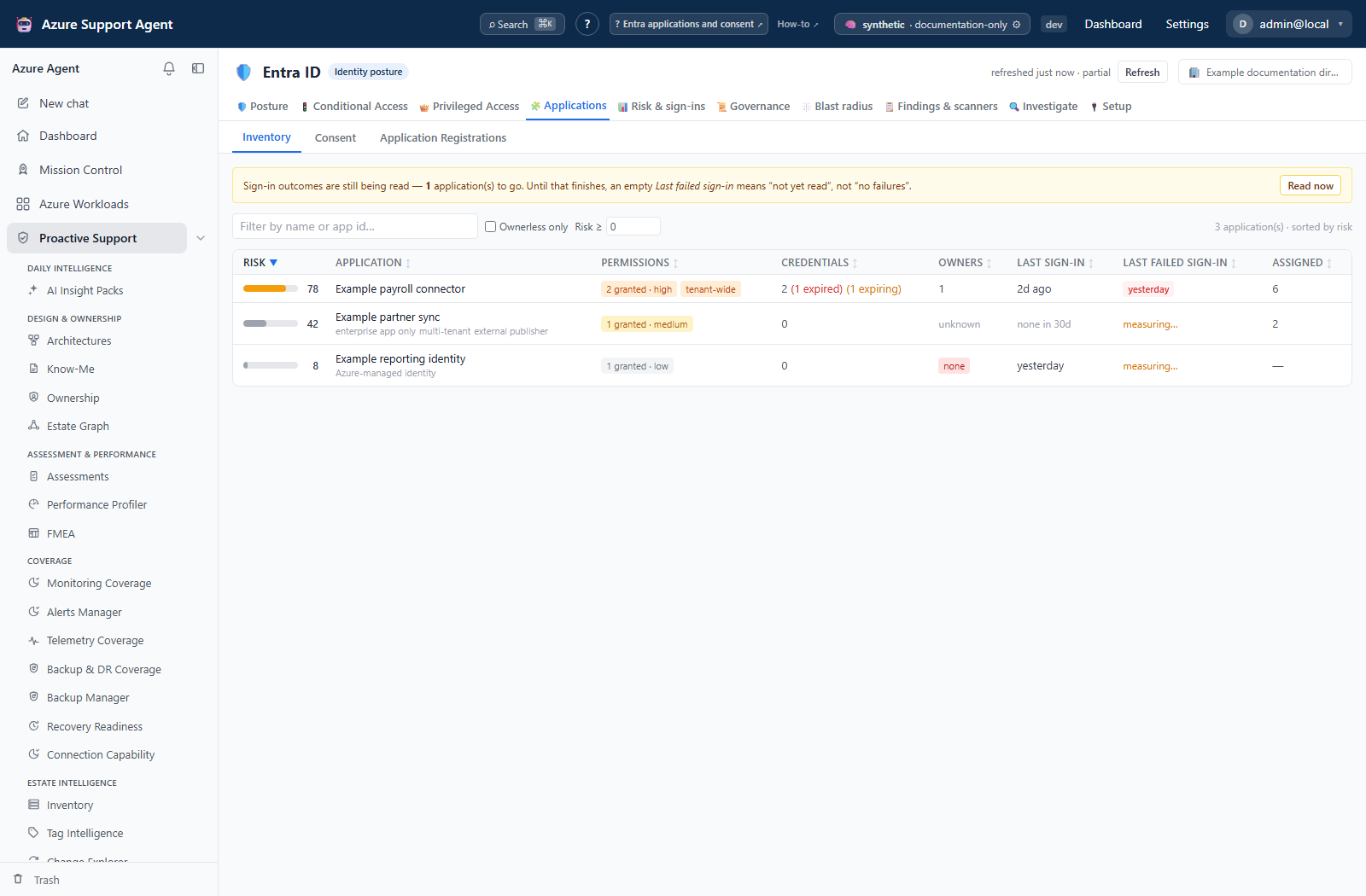
Risk is a weighted score out of 100, and the components are published by the API so the number is never a black box:
| Component | Weight |
|---|---|
| Granted permission tier | 30 |
| Can grant itself permissions | 15 |
| Credential hygiene | 15 |
| Ownership | 10 |
| Exposure (multi-tenant, publisher, redirect URIs) | 10 |
| Azure control-plane reach | 10 |
| Usage and assignment breadth | 5 |
| Conditional Access coverage | 5 |
A component can be marked not applicable with a stated reason — an Azure-managed identity is not scored on credentials or ownership, because the platform owns both.
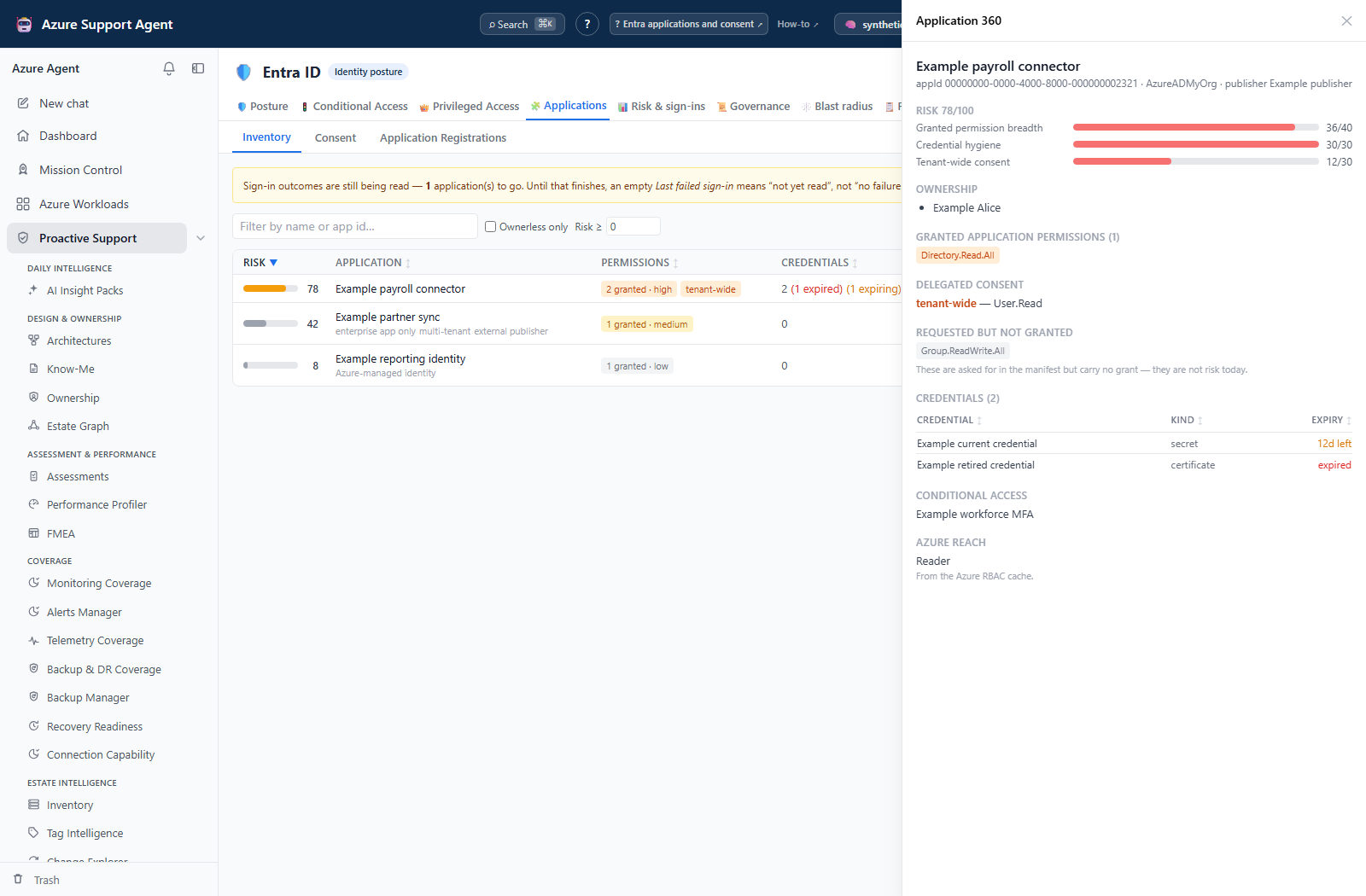
Selecting a row opens the application detail panel, which carries: the risk breakdown component by component with points against weight; owners resolved to names, with an explicit callout when there are none; granted application permissions as tier-colored chips; delegated consent separated into tenant-wide and per-user; requested-but-not-granted permissions, labeled as not being risk today; credentials with their name or identifier, their kind, and their expiry state; federated identity credentials with issuer and a flag for a wildcard subject; Conditional Access relevance, meaning which enforced policies target this application or all applications; Azure reach from the RBAC cache with a staleness note; provisioning jobs with their status and any quarantine; and the findings raised against this object. Redirect URIs are collected and feed the exposure component of the score. Sign-in audience, single sign-on mode, assignment requirement, and the owning tenant of an external application are shown as facts alongside the identifiers.
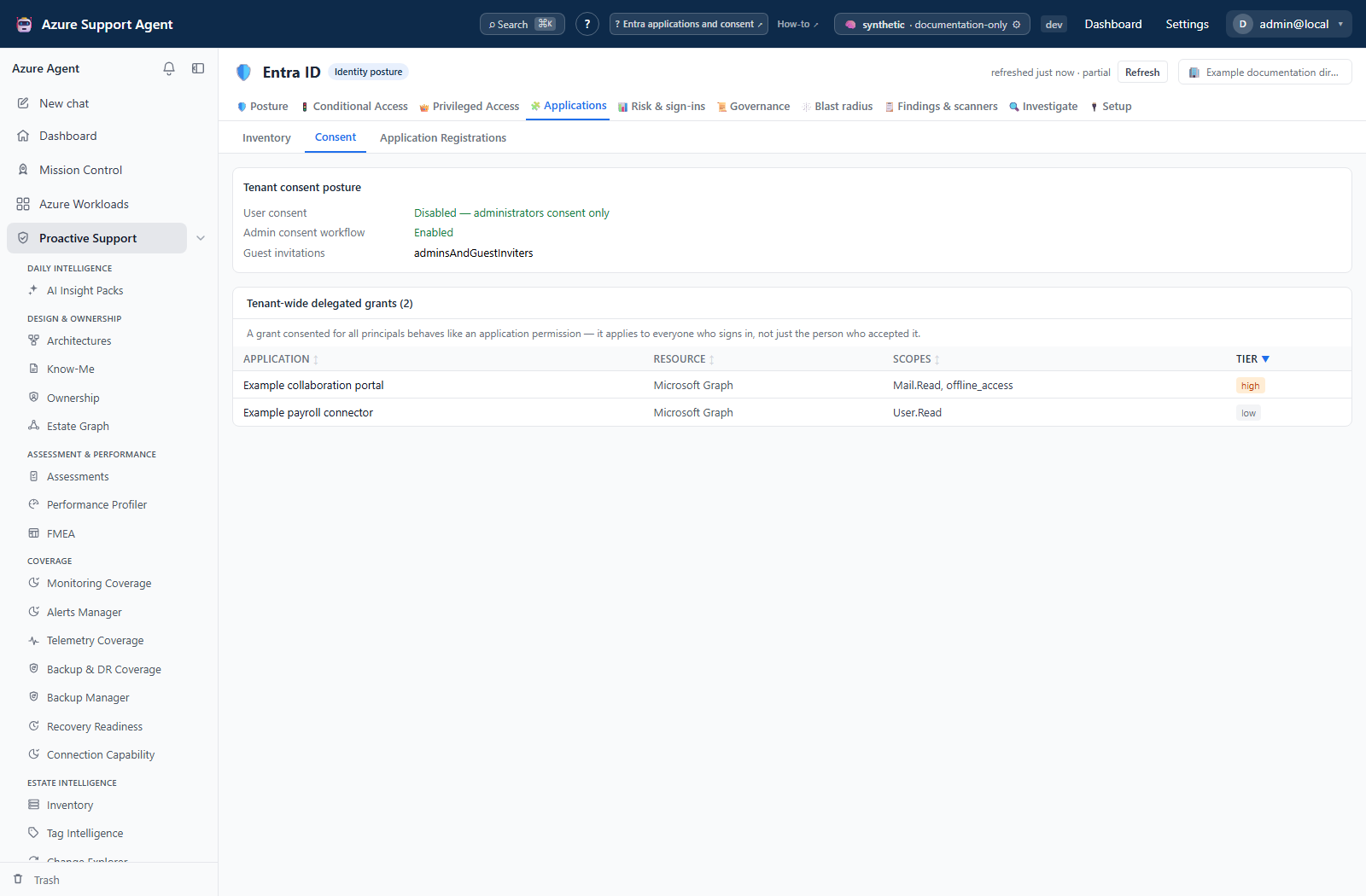
Consent reports the tenant posture — whether user consent is unrestricted, disabled, or restricted to low-risk permissions; whether the admin consent request workflow is enabled; and where guest invitations may come from — followed by a table of every delegated grant consented for all principals, with the client application, the resource, the scopes, and the highest tier among them. Permission grant policies are returned with the same payload.
Freshness and scope behavior
Inventory and Consent read the native Entra snapshot; their detail panel is cache-backed. Application Registrations has a separate snapshot and refresh. Per-application sign-in outcomes can be enriched after native collection or with Read now (entra.admin), so a completed inventory is not necessarily a completed outcome read.
Inventory shows Last sign-in and Last failed sign-in. Read the pending/off/not-measured banner before interpreting an empty cell. Backfill defaults to the visible-app scope, a 24-hour cache window, 100 applications per run and a 300-second budget; it reads at most 50 recent events per application over 30 days. An aggregate activity timestamp can be an attempt, not confirmed successful use; per-event outcomes provide the stronger evidence. These are bounded reads, not complete application audit histories.
Granted permissions are collected by querying the handful of resource service principals that matter — Microsoft Graph, the legacy Azure AD Graph, Exchange Online and SharePoint Online — for everyone holding one of their application permissions, rather than fanning a call out across every principal in the tenant. A consent granted minutes ago will not appear until the next collection.
Application Registrations refresh controls
The Registrations operational sub-tab keeps its own completed snapshot. Opening the tab only reads that cache; it does not call Microsoft Graph. An explicit refresh offers two modes:
- First N uses the administrator’s Application registration refresh limit. The default is 500 and Settings accepts 50–5,000.
- Full tenant deliberately follows Graph paging until the tenant has been enumerated. A 100,000-object emergency ceiling remains as protection against an accidental unbounded response; if reached, the result is visibly partial rather than presented as complete.
Before listing objects, the refresh asks Graph for the tenant’s application count. The progress panel then reports fetched / total, page number, percentage, retries, and throttles. Graph pages contain up to 250 objects by default. The collector honors Retry-After on throttling and uses bounded exponential backoff when Graph does not provide one.
Every completed page is checkpointed separately from the completed snapshot. Navigating away does not stop the job. If the application process restarts or a Graph request fails, returning to the page resumes from the saved continuation when it is still valid; an expired continuation restarts safely from page one. Checkpoints expire after 24 hours.
Each application page is also joined to its local enterprise application through the immutable application ID. The join uses read-only Microsoft Graph batches of at most 20 lookups. State is checkpointed with the page, so a resumed scan does not repeat completed lookups. The grid and exports distinguish four outcomes: Active, Deactivated, No local enterprise app, and Unknown when the state was not readable. Missing state is never interpreted as deactivated. Microsoft’s separate disable-status field is displayed independently from the tenant operator’s enabled/deactivated state.
Cancel stops the active refresh and keeps completed pages available for resume. Cancellation, failure, or an incomplete provider response never replaces the previous completed snapshot. Only a successful refresh publishes the new cache. Completion metadata records mode, Graph total, fetched count, pages, duration, retries, throttles, resume state, truncation, and stop reason.
Interpretation of results
Registrations permissions are requested permissions. That operational panel reads the app manifest’s requiredResourceAccess; its Application/Delegated counts do not prove tenant consent. Use the native Inventory detail’s granted application and delegated permissions to establish actual grants. The two panels answer different questions and must not be reconciled merely by comparing their permission counts.
- A large permission count is not automatically bad, and a small one is not automatically safe. One
RoleManagement.ReadWrite.Directorygrant outranks forty read scopes. Read the tier and the self-grant marker, not the number. - Self-grant is the tenant-takeover primitive. An application able to assign app roles or write applications, directory objects, or permission-grant policy can give itself everything else. Treat that marker as the top of the queue.
- Tenant-wide delegated consent is not app-only access.
AllPrincipalsremoves the need for each user to consent, but delegated operations still run in a signed-in user context and are constrained by that user’s access. - Requested is not granted. Permissions in the manifest with no matching assignment carry no access. They are worth reviewing before the next consent, not today.
- No owner is an operational finding. Nobody is accountable for rotating the credentials or retiring the application, which is usually why the credential is the one that expires unnoticed.
- Deactivated does not mean harmless or deleted. The corresponding service principal is disabled, but the registration, credentials and requested permissions still exist and can become effective again if it is re-enabled. The Registrations view therefore keeps all risk and credential evidence visible and offers a dedicated state filter and workbook sheet.
- No local enterprise app is not the same as deactivated. It means this tenant has no corresponding service principal for the registration. Unknown means Graph did not return a trustworthy state; neither outcome is converted to a disabled verdict.
- A multi-decade credential lifetime is itself the finding. It is reported as an approximate lifetime in years rather than a raw day count, because a secret that cannot be rotated on any sensible schedule is not a neutral fact.
- Unverified publisher and external publisher are context, not verdicts. Plenty of legitimate internal applications have neither.
Safety and limitations
- Every collector is read-only. No application, service principal, credential, consent grant, or policy is modified.
- No secret or certificate value is ever retrieved or displayed. Only the credential’s identifier or display name, its kind, and its expiry are collected. There is no code path that reads a secret value, and there could not be one — Microsoft Graph does not return it after creation.
- Credential rotation happens outside this product. This screen tells you what is about to expire and who owns it; creating, replacing, and removing credentials is done in the Microsoft Entra admin center through your change process.
- Microsoft first-party service principals are excluded from the grid, so the counts are about the tenant’s own and its third-party applications.
- Permission tiering is a judgment about blast radius, not a Microsoft classification. An unrecognized write-scoped permission is treated as high rather than ignored.
- Conditional Access relevance is derived from the snapshot’s enforced policies and application targeting; it is not a Microsoft what-if evaluation.
- Azure reach comes from the RBAC cache and can be older than the Entra snapshot. The panel says so when it is.
- Application 360’s CA relevance is a simple enabled-policy/all-apps or explicit-app join, not a complete exclusion, cohort or condition evaluation. Likewise an empty owner detail is not sufficient when the grid says ownership was unreadable.
- Registrations CSV reflects local filters; Excel (all sheets) exports all applications in that panel’s completed cache. The native Entra workbook is a different snapshot. None can recover objects excluded by upstream collection caps.
- Exports and screenshots of this tab contain application identifiers and consent detail. Handle them as governance material.
Troubleshooting
| Symptom | Check |
|---|---|
Grid is empty and the badge says never loaded | Start a collection from the freshness badge; sub-tabs never collect on their own. |
Owners column reads unknown rather than a number | The owners read failed or was not consented. Ownership is not scored when it is unknown. |
Risk components show n/a | The component does not apply to that identity — most often an Azure-managed identity. |
| Consent posture fields are blank | Grant Policy.Read.PermissionGrant and re-collect. |
| Provisioning block never appears | Grant Synchronization.Read.All; without it provisioning jobs are not collected. |
| Azure reach is missing for a service principal you expect | No RBAC scan exists, or the principal holds no Azure role in the scanned scope. |
| An app consented today is absent | Consent is eventually consistent and the grid reads a snapshot. Refresh. |
| A permission chip shows an identifier instead of a name | The resource service principal could not be resolved; the permission is reported rather than dropped. |
| Refresh returns a permission error | Collection requires entra.admin, not entra.read. |
| Refresh appears paused | Read the page/total progress and retry delay. Graph throttling is retried automatically. |
| The server restarted during a refresh | Return to Registrations. A checkpointed run resumes automatically if it is less than 24 hours old. |
The result says N of M (capped) | Increase the normal limit in Settings or choose Full tenant, then refresh. |
| A refresh failed or was cancelled | The prior completed snapshot remains active. Press Refresh to resume the checkpointed pages. |
State says Unknown | The service-principal lookup was incomplete or unreadable. Refresh after checking Application.Read.All or Directory.Read.All; do not treat Unknown as deactivated. |
State says No local enterprise app | The app registration exists but no corresponding service principal is instantiated in this tenant. |