Entra: setup and coverage
Product permission: entra.read to view; entra.admin to re-check permissions or start a collection.
Purpose
App route: /entra/setup
Setup & coverage is the page that decides whether every other Entra tab can tell you the truth. It reports the consent tier the tenant has actually granted, what each tier unlocks, which collector domains are measured or blind, and why. Read it first and read it again whenever a tab claims it cannot see something.
Prerequisites and data sources
- A connection holding service-principal credentials (tenant ID, client ID, and a client secret or certificate) for the tenant you want to analyze.
- A directory role that can grant admin consent in the Microsoft Entra admin center — this app cannot grant consent for you.
- Entra ID P1 or P2 where the data itself is license-gated.
Data comes from two sources: the token’s own scope claims, and a live probe that issues one cheap read per domain against Microsoft Graph.
Consent tiers
Every scope this feature requests is an Application permission and every one is read-only. The product never requests a ReadWrite scope for posture collection and never writes to the directory.
Tier 1 — Minimum viable
Unlocks the posture score, applications, directory roles, and the Conditional Access inventory.
| Scope | Why |
|---|---|
Directory.Read.All | Users, groups, roles, and directory objects |
Application.Read.All | App registrations and service principals |
Policy.Read.All | Conditional Access policies, named locations, authentication strengths |
RoleManagement.Read.Directory | Directory role definitions and assignments |
Organization.Read.All | Tenant profile, license state, verified domains |
Tier 2 — Recommended
Adds dormancy, MFA registration truth, consent posture, change history, and sign-in analysis.
| Scope | Why |
|---|---|
AuditLog.Read.All | Sign-in and directory audit logs |
Reports.Read.All | Registration and usage reports |
UserAuthenticationMethod.Read.All | Which methods each user actually registered |
Group.Read.All | Group objects used in policy and role scoping |
GroupMember.Read.All | Transitive membership for effective-user resolution |
Policy.Read.PermissionGrant | Consent and permission-grant policies |
Device.Read.All | Device compliance and join state used by Conditional Access |
Synchronization.Read.All | Provisioning jobs on enterprise applications |
SecurityEvents.Read.All | Security alerts correlated with identity findings |
Tier 3 — Complete
Adds PIM depth, Identity Protection risk, access reviews, entitlement management, and lifecycle workflows.
| Scope | Why |
|---|---|
RoleManagementPolicy.Read.Directory | Per-role PIM configuration (MFA, justification, approval, duration) |
RoleAssignmentSchedule.Read.Directory | Activation history with requestor, justification, and ticket |
PrivilegedAccess.Read.AzureAD | PIM eligibility and assignment schedules |
PrivilegedAccess.Read.AzureADGroup | PIM for groups |
IdentityRiskyUser.Read.All | Identity Protection risky users |
IdentityRiskEvent.Read.All | Risk detections behind those users |
IdentityRiskyServicePrincipal.Read.All | Risky workload identities |
AccessReview.Read.All | Access review campaigns and decisions |
EntitlementManagement.Read.All | Access packages and assignment expiry |
LifecycleWorkflows.Read.All | Joiner, mover, and leaver workflows |
OnPremDirectorySynchronization.Read.All | Hybrid sync configuration and health |
IdentityProvider.Read.All | External identity providers guests sign in with |
DirectoryRecommendations.Read.All | Microsoft’s own directory recommendations |
The catalog lists 27 scopes across tiers of 5, 9 and 13. Tier completion describes that catalog, not guaranteed data coverage. Permission probes cover 11 domains, while full refresh has nine collector domains; devices/hybrid appear in capability checks without separate full-refresh collectors.
For activation sessions, distinguish PIM configuration, schedule instances and justification. Instances can use RoleManagement.Read.Directory; the read-only source of Entra activation justification is the PIM directory-audit log under AuditLog.Read.All. Although RoleAssignmentSchedule.Read.Directory remains in the tier catalog, it does not by itself open the app-only schedule-request endpoint. Do not grant Graph write scopes merely to read justification.
Identity fabric
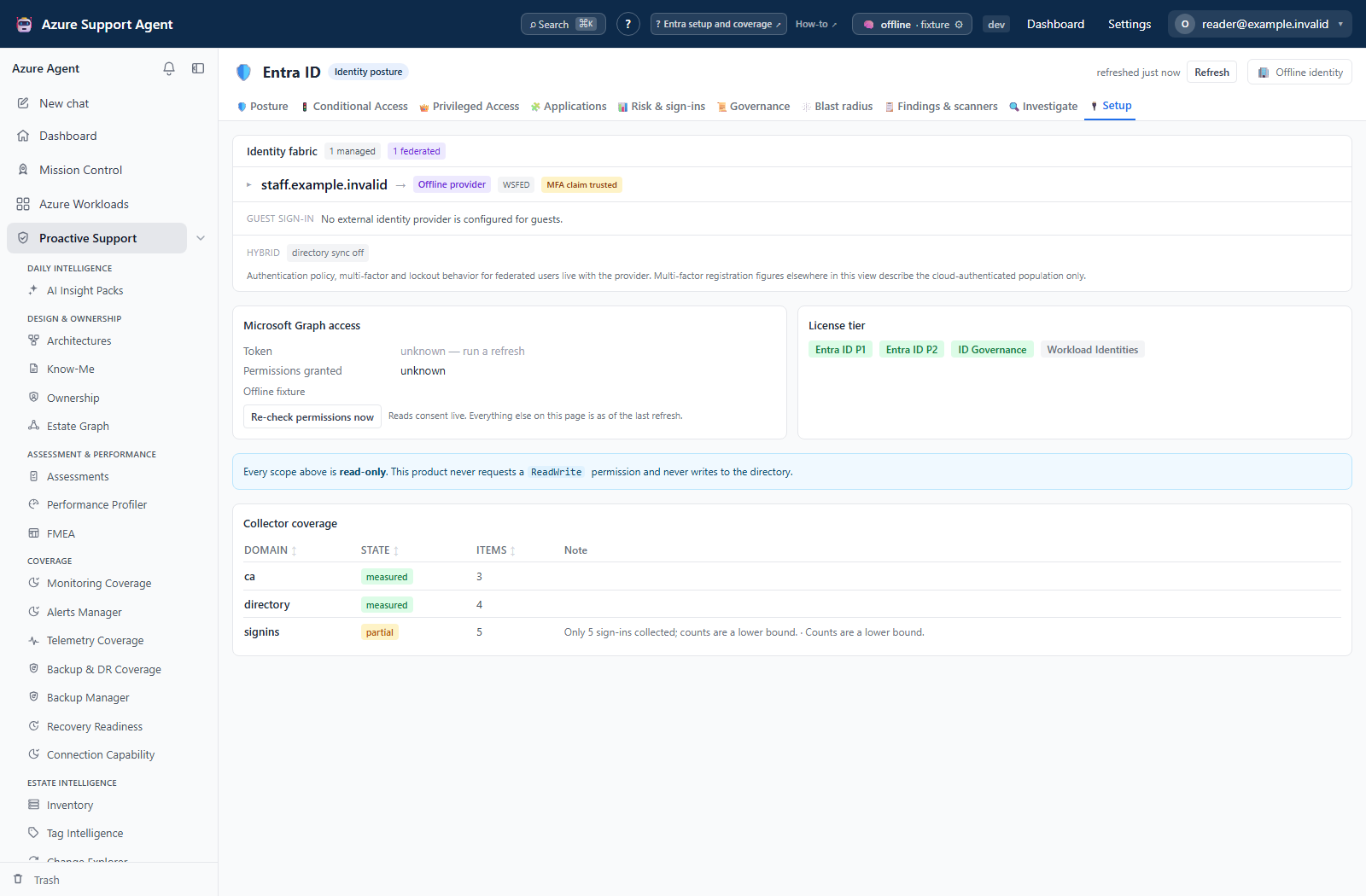
The card above the coverage table answers a question no other screen does: does this tenant authenticate its own users?
A domain is either managed — Entra signs those users in — or federated, meaning an external identity provider does it and Entra accepts the result. The card names every federated domain, fingerprints the provider from its issuer URI and endpoints (PingFederate, PingOne, Okta, AD FS, OneLogin, Auth0, Shibboleth and others; an unrecognized provider is reported as unrecognized, with its host, rather than guessed), and states how many users sit behind it.
These views use illustrative browser fixtures, not a live Microsoft Graph probe or a computed assessment of an authentication trust.
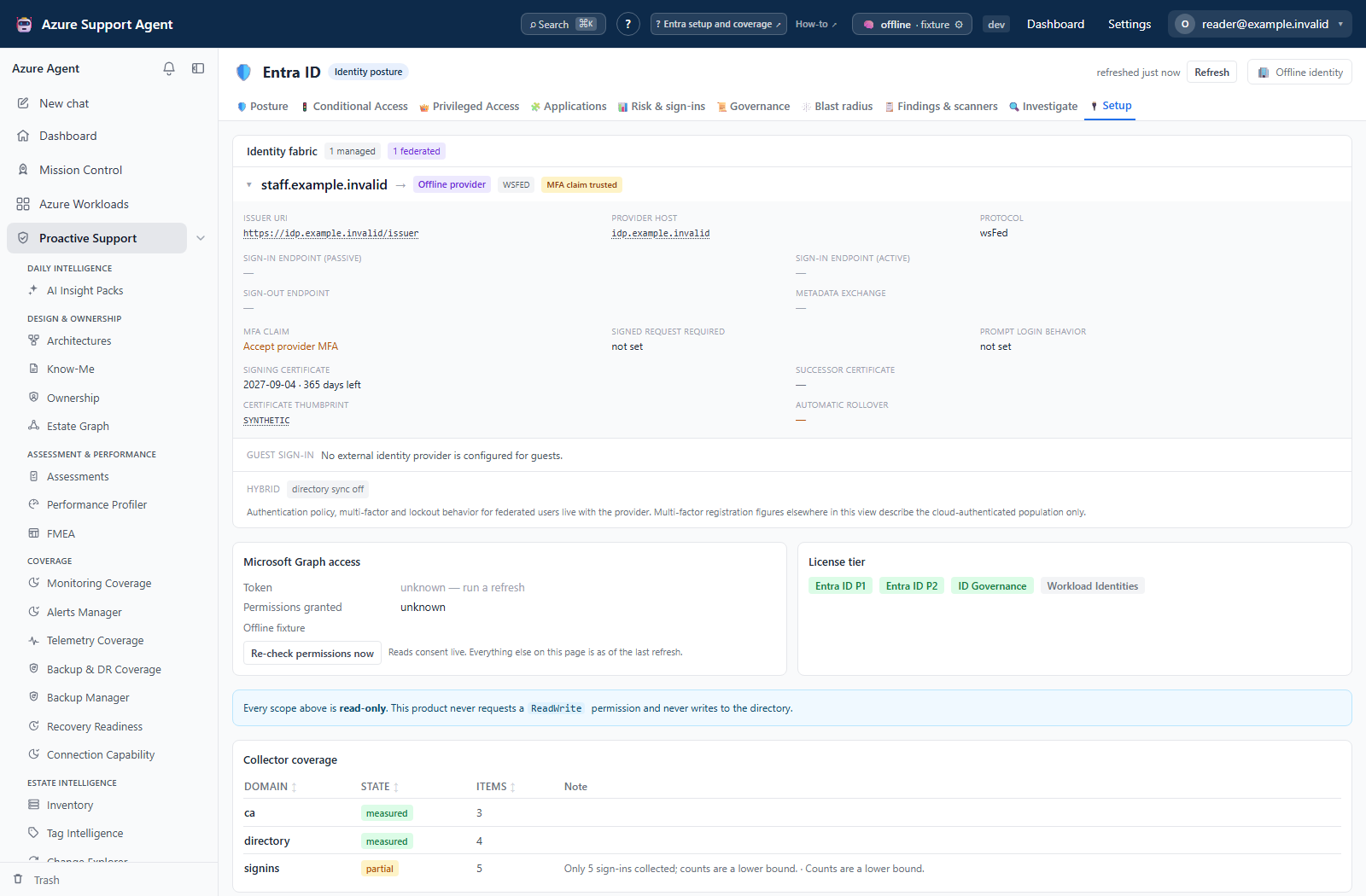
Expanding a federated domain shows the trust in full:
| Group | Fields |
|---|---|
| Identity | Issuer URI, provider host, protocol (WS-Fed or SAML) |
| Endpoints | Passive and active sign-in, sign-out, metadata exchange |
| Security | MFA claim behavior, signed-request requirement, prompt-login behavior |
| Certificate | Signing and successor certificate expiry, thumbprint, automatic rollover result |
The MFA claim row is the one that matters most. When federatedIdpMfaBehavior is unset, Entra applies the permissive default and accepts multi-factor authentication performed by the provider — so a Conditional Access policy requiring MFA can be satisfied by a system Entra does not control. The card says so explicitly, and the same condition is raised as a high-severity finding.
The certificate rows read the signing and successor certificates together, because Entra accepts either. A trust whose primary certificate has expired but whose successor is valid is not an outage; it is reported as running on its successor, with the note that the overlap protecting the next renewal has been spent. Only the derived facts are ever shown — subject, issuer, thumbprint and expiry. The certificate itself is parsed during collection and discarded, the same rule application credentials follow.
Below the trusts, the guest sign-in row lists the external identity providers configured for external users — social providers such as Google or Apple, and SAML or WS-Fed federation with a partner domain. This is a second and entirely separate perimeter: a tenant can authenticate every one of its own staff in the cloud and still accept a partner’s identity provider for guests. It needs IdentityProvider.Read.All, which nothing else in the product uses, so it is commonly the last part of the perimeter to become legible. When the scope is missing the row says so — “not readable” is shown rather than the silence that would read as “no guest provider is configured”. Only the registration is shown: the display name, the provider type, the issuer and the client identifier. The client secret is never requested.
Below that, the hybrid row reports directory synchronisation, its last run, password hash synchronisation, writeback settings and accidental-deletion prevention. On a federated tenant, password hash synchronisation being off means there is no fallback when the provider is unreachable and leaked-credential detection cannot run at all.
A tenant with no federated domains gets a single sentence saying every domain authenticates in Entra ID — that is the good outcome, not an empty table. If the domain list itself cannot be read, the card says so rather than implying a clean perimeter. A snapshot collected before this check existed is labeled as such and asks for a refresh, which is a different statement again from a permission problem.
The same facts are carried, in one line, to the two screens whose own numbers depend on them: the Posture header and the auth methods sub-view of Risk & sign-ins. The federation scope of Blast radius draws the consequence.
Tabs and actions
Setup & coverage is a single page with blockers, Identity fabric, Graph access, license flags, consent tiers, domain coverage and collection statistics.
- App registration shows the tenant and client the connection is using, with a link to the consent page. Grant each scope as an Application permission — delegated consent will not work for background collection.
- Consent tiers lists all three tiers with per-scope granted or missing state and a completeness marker per tier.
- Re-check permissions now asks Microsoft rather than trusting the cached snapshot. It reports what is granted, what was gained since the last check, what was revoked, which domains remain blind, and whether a fresh collection is needed to make the new scopes count.
- Domain coverage is a table of collector domains — tenant, people, apps, roles, Conditional Access, PIM, activations, risk, governance, devices, hybrid — with a state, an item count, and the reason for anything short of measured.
Freshness and scope behavior
Granting consent does not change any screen on its own. The sequence is always: grant in Entra → Re-check permissions now → start a collection from the freshness badge → read the tabs.
Consent propagation is not instant. If a re-check still reports a scope as missing a minute after you granted it, wait and re-check again before assuming the grant failed.
Interpretation of results
Domain state is deliberately narrow, because “we got no data” has several very different causes.
| State | Meaning | What to do |
|---|---|---|
measured | The domain was collected successfully | Nothing |
partial | Some of the domain collected; the rest failed or was truncated | Read the reason; usually throttling or a capped enumeration |
blind | No alternative scope in the requirement group is granted | Grant the missing tier and re-collect |
unlicensed | The scope is consented, but the tenant lacks the Entra ID P1/P2 license for the data | Nothing to fix with consent |
error | The collector failed for another reason | Read the message on the diagnostics view |
stale | Data came from an earlier snapshot | Refresh |
Only an HTTP 403 is evidence about consent. Microsoft answers a missing Entra ID P2 or Governance license with a 400 or a 403 carrying a license marker in the message, so the probe classifies responses as permitted, denied, unlicensed, or inconclusive rather than mapping every failure to “grant more permissions”. An inconclusive probe means the answer is unknown — do not grant scopes in response to it.
Several domains accept alternative scopes. Directory.Read.All is a superset of a number of narrower reads, so a domain is only blind when none of its alternatives are held.
Safety and limitations
- The probe issues one small read per domain. It is safe to run and does not modify anything.
- This page cannot grant consent, and the product deliberately has no path to do so.
- The setup page reflects the connection’s own service principal. Switching connections switches tenants and every state on the page.
- Never paste real tenant IDs, client IDs, object IDs, or secrets into tickets, prompts, or documentation taken from this page.
Troubleshooting
| Symptom | Check |
|---|---|
| A tier shows granted but a domain is still blind | Re-check permissions, then run a collection — the snapshot predates the grant. |
| Every domain is blind | The connection cannot obtain a Graph token at all; verify tenant, client, and secret or certificate. |
| PIM configuration is measured but activation detail is absent | Check RoleManagement.Read.Directory for schedule instances and AuditLog.Read.All for PIM audit justification, then refresh. Configuration and event evidence are different reads. |
| Risk and governance report unlicensed | The tenant lacks Entra ID P2 or Governance; consent will not help. |
| Probe result is inconclusive | Usually throttling or a transient Graph error; re-check later. |
| Consent granted minutes ago is still missing | Wait for propagation and re-check before re-granting. |