Azure Tenants
Permissions: connections.manage to add, edit, test, default, disable, or delete a connection
Purpose
App route: /admin/tenants
A connection describes how the application authenticates to one Azure tenant and how far it may act inside it. Each connection stores a display name, tenant and client identifiers, authentication material, default scope, governance flags, and its last test result. Credentials are encrypted at rest and never returned to the browser.
The authentication method is not just a credential format — it determines which features can work at all. A pasted token cannot query Log Analytics, and only a service principal can authenticate to Microsoft Graph. Choose the method from the capability table below rather than from convenience.
Prerequisites and data sources
- Product permission
connections.manage. - The Azure tenant ID, and for service-principal methods an app registration with a client secret or certificate.
- Azure RBAC assigned at the intended scope. Authenticating successfully grants no resource access on its own.
- Microsoft Graph application permissions and admin consent, only when Entra features are required.
Choose an authentication method
| Method | Form label | Best for |
|---|---|---|
| Service principal (client secret) | Service principal (client secret) | Enterprise and cross-tenant use. The most capable option. |
| Service principal (certificate) | Service principal (certificate) | The same capability where policy forbids shared secrets. |
| Host identity | Host identity (managed identity / az login) | A single tenant the server already runs in. No stored credential. |
| Pasted Azure CLI token | Paste Azure CLI token (short-lived) | A quick look. Expires in about an hour and cannot refresh. |
What each method can do
| Capability | Client secret | Certificate | Host identity | Pasted token |
|---|---|---|---|---|
| ARM and Resource Graph | Yes | Yes | Yes | Yes, until the token expires |
| Log Analytics queries | Yes | Yes | Yes | No — refused, different token audience |
| Entra and Microsoft Graph features | Yes | Yes | No | No |
| Cross-tenant | Yes | Yes | No — single tenant | Single tenant |
| Unattended and long-lived | Yes | Yes | Yes | No |
Entra and Microsoft Graph features require an explicit service-principal identity with a client secret or certificate. Host identity and pasted tokens cannot authenticate to Graph as an application, and those features report that directly instead of returning empty results.
Tabs and actions
| Action | Effect |
|---|---|
| Save | Stores the connection. Secret, certificate, and token fields are write-only; leaving one blank on a later edit keeps the stored value. |
| Test | Acquires an ARM token and records the result on the connection. |
| Discover | Enumerates visible subscriptions and management groups. |
| Pull subscriptions | Fills the default subscription list live. Save the connection first. |
| Validate EntraID | Reports Microsoft Graph permissions. Service-principal connections only. |
| Set default | Makes this the connection used when a feature does not choose one. Only one connection is default. |
Shared fields
Every method shares these fields; only the credential fields differ.
- Display name — non-sensitive label shown in scope pickers.
- Tenant ID — required for every method except the pasted token, which carries its own tenant.
- Azure cloud — Azure public cloud, Azure US Government, or Azure China. Controls cloud-aware portal links in reports and actions.
- Default subscription and Log Analytics workspace ID — set only when workflows need them.
- Read only, Automatic writes, Default, Disabled — per-connection governance that overrides global settings.
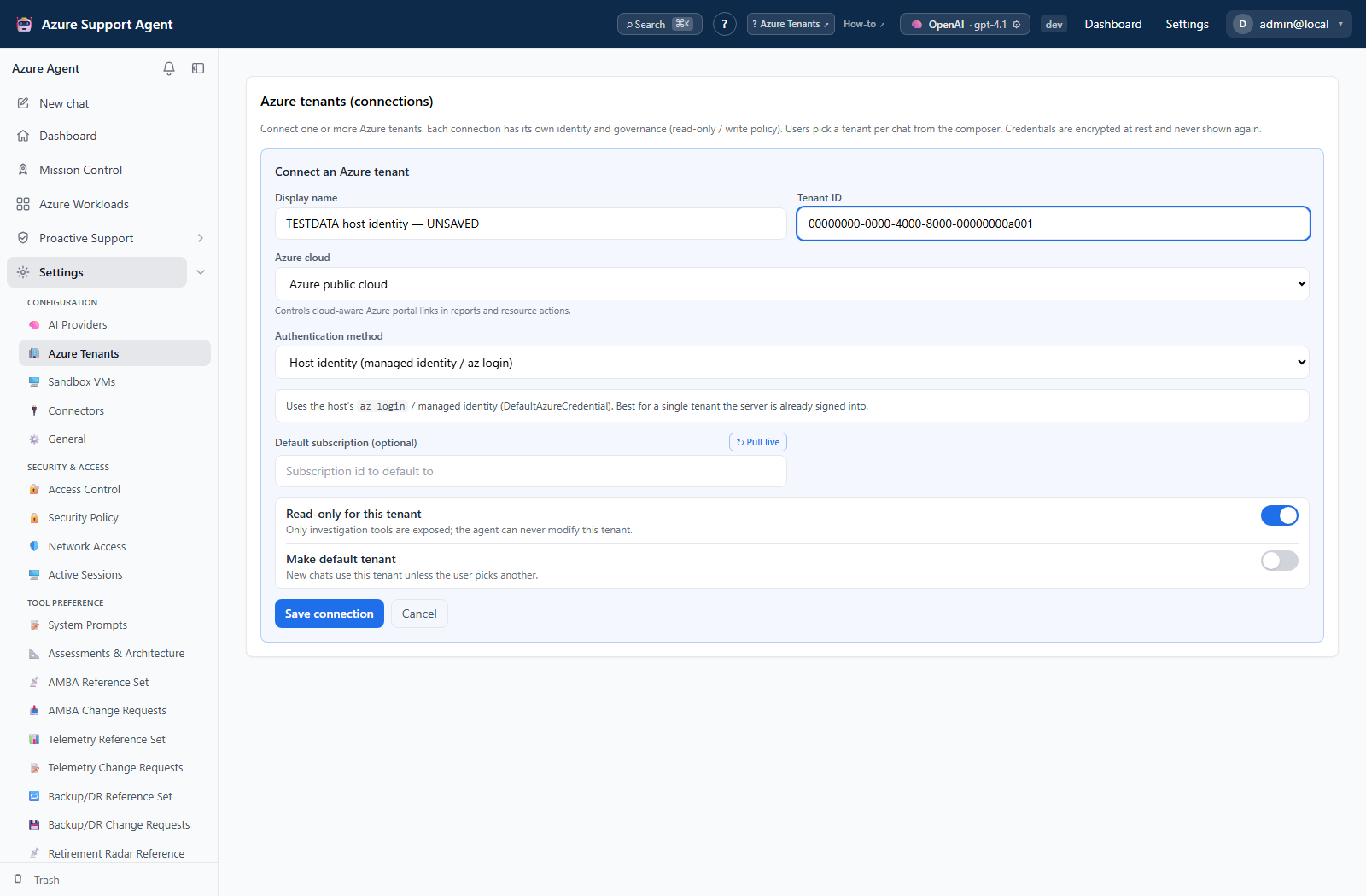
The authentication-method pages above show the corresponding secret, certificate, host-identity, and token forms. All captured forms are unsaved examples, not successful connection tests.
Freshness and scope behavior
A connection’s status reflects its last test, not continuous health. Pasted-token connections expire in about an hour and then fail until a new token is pasted; every other method acquires tokens on demand. A workload is bound to the connection that owns it, so selecting a workload switches the active connection rather than reinterpreting its resources in the current one.
Workflow overview
- Create the connection with a non-sensitive display name and the tenant ID.
- Choose the authentication method and complete only its fields. Follow its detail page for the Azure-side setup.
- Keep Read only enabled during onboarding.
- Save, then Test to confirm an ARM token is obtainable.
- Discover subscriptions and management groups, and correct the default scope.
- Validate EntraID only when Entra features are required.
- Set one connection as default.
Interpretation of results
A successful test proves only that a token was acquired. Visible scope comes from Azure RBAC, so a connection can test green and still return nothing. If a feature looks empty, confirm the role assignment at the intended scope before assuming a product fault. Open Connection Capability to see ARM, Resource Graph, Graph, Log Analytics, and write-gating side by side.
Exports, history, scheduling, and integrations
Connections have no dedicated export or schedule. They are referenced by every scoped feature and by connectors that reuse a service principal for Microsoft Graph.
Safety and limitations
Deleting a connection does not revoke its Azure credential. Rotate or revoke the secret, certificate, or role assignment at its authority. Prefer Disabled over deletion while dependencies are still being assessed, because disabling keeps the record and its scope history.
Troubleshooting
| Symptom | Resolution |
|---|---|
| Test cannot acquire a token | Verify tenant and client identifiers, credential validity, the selected Azure cloud, host clock, and outbound network access. |
| Test succeeds but no subscriptions appear | Assign Azure RBAC at the intended scope. Authentication alone grants no resource access. |
| A feature reports the wrong tenant | Confirm which connection owns the selected workload; workload scope follows its own connection. |
| Entra validation is unavailable | Use a service-principal connection. Host identity and pasted tokens cannot authenticate to Microsoft Graph. |
| Log Analytics queries are refused | Use any method other than the pasted token, which cannot obtain a Log Analytics audience token. |
Related pages
- Manage Azure tenants (how-to)
- Sandbox VMs
- Connection Capability
- Microsoft Entra setup
- Credential handling
- Permissions reference