IAM: reviews and PIM
Product permission: iam.read to view campaigns, campaign detail and the PIM tab. iam.review to create, activate, decide, re-check, complete, generate remediation for, or write evidence for a campaign — an auditor reads the review; they do not record the decisions they are auditing.
Purpose
App routes: /iam/reviews — tab label Reviews; /iam/pim — tab label PIM
Reviews is a certification workflow held entirely in this product: a campaign freezes a selection of access from a snapshot, routes each item to a reviewer, records decisions with reasons, and produces a hashed evidence pack and a remediation script somebody else runs. PIM answers the one question “privileged” alone cannot: how much of that privileged access is held permanently, and how much has to be requested and expires.
Entra Access Reviews cover directory roles and group membership. They do not cover Azure RBAC at resource scope, Key Vault access policies, classic administrators or bypass credentials. This does.
Screenshot notes: These synthetic browser fixtures illustrate review states and item context, not actual campaign execution or backend analysis. Names, selectors and counts are examples, not defaults. No decision, evidence export or remediation script was generated for the captures.
Prerequisites and data sources
- Product permission
iam.read;iam.reviewfor every write on the Reviews tab. - A cached access snapshot. A campaign certifies a specific snapshot, so the answer to who had this access, and who signed it off stays available after the estate has moved on.
- PIM eligibility requires the PIM collectors to have run for the cached scopes with a connection able to read the PIM schedules. Without that, eligibility is not merely empty — it is unmeasured, and the tab says so.
- Ownership records can route an item to a scope owner. The manager lookup currently returns no manager; manager strategy falls back to ownership and then an API-supplied fallback, or leaves the item unassigned.
- The create API supplies up to 500 findings for context but does not pass an escalation graph. Item usage is currently an unmeasured placeholder, even if a separate usage scan exists; inspect Least Privilege and Escalation independently.
- Evidence packs are written to the evidence registry with an audit retention class.
Tabs and actions
Reviews
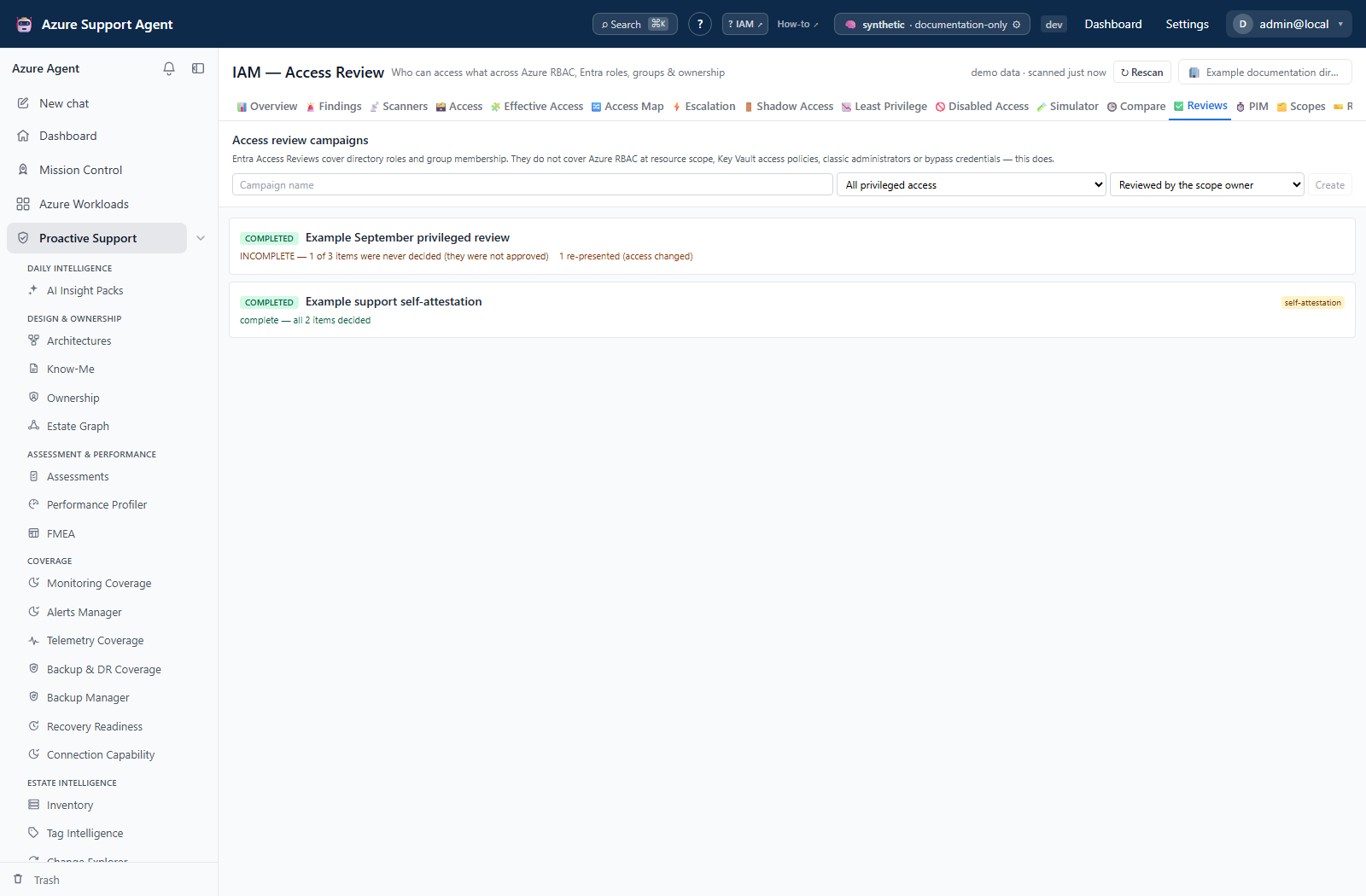
The list view creates campaigns and shows their state; selecting one opens the detail view.
Creating a campaign. The form offers a name, four selectors (privileged, external, service principals, findings-linked) and three reviewer strategies (owner, manager, self). The API also accepts scope/disabled selectors, fixed strategy, fallback reviewer, description, baseline run ID, due date and reminder days. Creation uses the current access rows, even if a baseline ID is supplied; it does not automatically pin that run. Preserve a baseline separately when required.
Creation deduplicates equivalent review keys, retains at most 2,000 items, and sets stats.truncated when it drops the rest; it does not reject an oversized selector. The list returns at most 50 campaigns and detail returns at most 500 items, with no paging control on the tab. Keep campaigns within that reviewable size and compare returned items with stats.total before completion. The external selector’s service-principal branch uses presence of an app ID, not verified multi-tenant status.
Self-attestation is labeled everywhere it appears — on the card, in the detail header, and in the evidence pack. Principals reviewing their own access is not independent certification and must not be mistaken for it six months later.
Lifecycle. draft → active → completed, with expired and cancelled as terminal states. Activate opens a draft for decisions. Complete closes an active campaign.
Completeness is reported, not just status. While a campaign is open the card shows decided/total. Once it is completed or expired the card states either complete — all N items decided or INCOMPLETE — N of M items were never decided (they were not approved). “Completed” alone implies everything was reviewed; a campaign that closed with a large fraction untouched is a different artifact and says so. Undecided items are never rendered as approved.
Decisions. Four are offered on the item row — approve, revoke, reduce, needs_info — and the API also accepts delegate, which carries a delegate target. Undecided is None and is never the same as approved. A reason field sits beside the buttons.
Items carry the context a decision needs, not just a row: whether the access is held directly or through a group and the group chain if so, whether it is standing privilege that nothing expires, how many escalation paths it reaches full control through, the open findings against it, and a usage note. The usage note exists so unmeasured usage is never presented as unused.
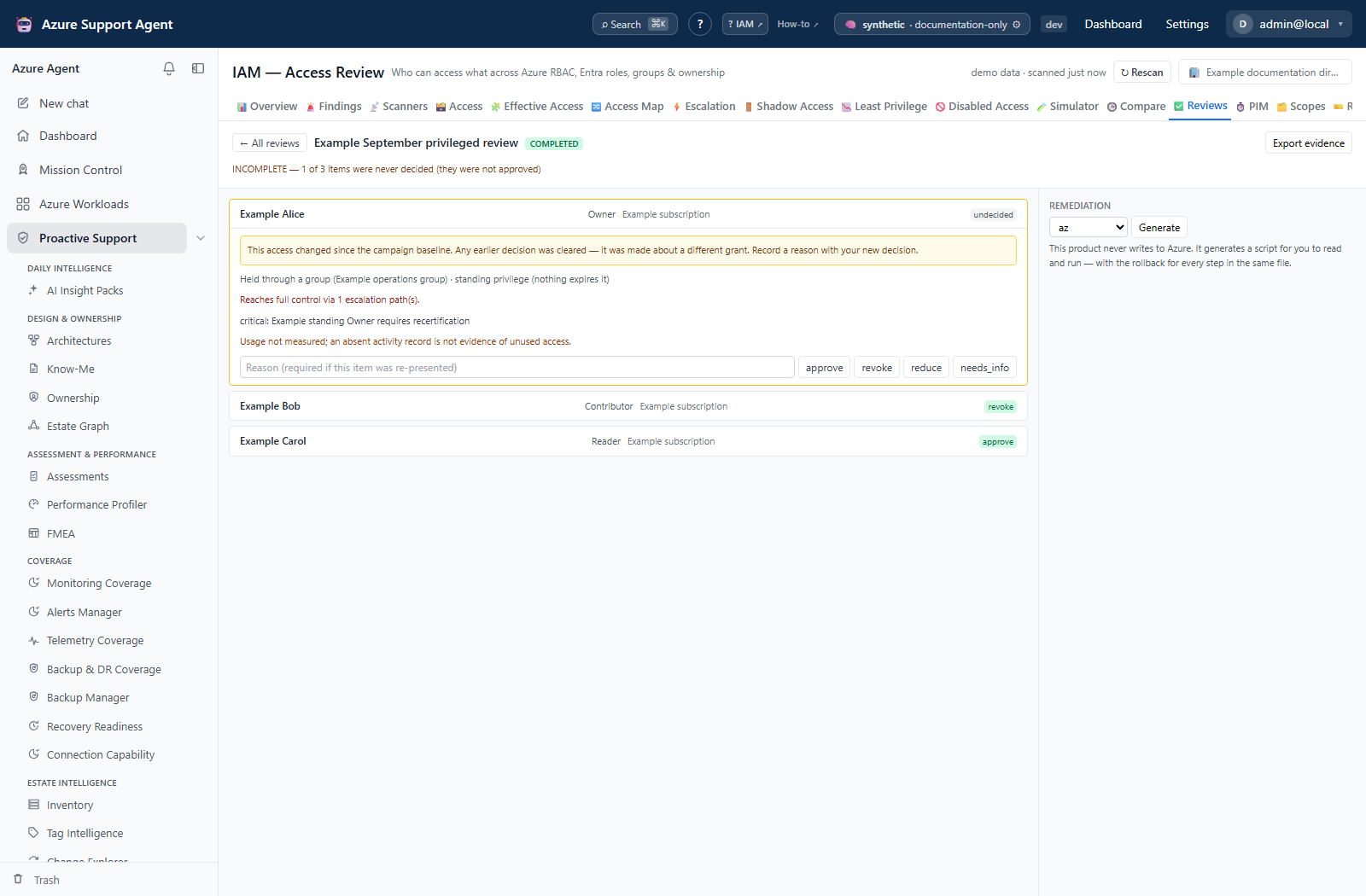
Re-check compares existing item keys with current cached access. It does not add newly matching identities, re-run the original selector, or replace frozen item snapshots. A missing key flags the item and can clear its prior decision; changes outside that key may not be detected. A reason is required when deciding a flagged item. The endpoint then attempts revocation confirmation, but a decision cleared by the first pass is no longer eligible for that confirmation. Verify cloud state independently rather than promising that every successful removal becomes confirmed_applied.
Remediation (POST /api/iam/campaigns/{id}/remediation) generates an ordered script from the recorded revoke and reduce decisions, in az, powershell, bicep or terraform. Ordering is group-derived access first, then broadest scope first. Every step has its rollback in the same file, in a rollback section at the end — a revoke script without the matching create is not shippable. The script is generated on demand and never stored: a saved script goes stale against a moving estate, and the assignment id it references may already belong to something else. Generation aborts with an error rather than emitting anything that looks like a credential. The product generates the script; a human reads and runs it.
Evidence (POST /api/iam/campaigns/{id}/evidence) writes an immutable, hashed snapshot of the campaign, its items, its baseline run and the framework mapping into the evidence registry, tagged for audit retention, and returns a SHA-256 digest. It is refused on a campaign that is still running — an evidence pack for a review in progress is a moving target.
PIM
Reads the KPIs from GET /api/iam/overview and two server-side lenses over the access grid: GET /api/iam/access?tab=eligible and tab=elevated. These are server filters rather than a client-side filter of a page, because the tab needs all eligible grants — filtering one page of a large estate client-side produced a list headed with a count that silently excluded most of the tenant’s eligible assignments while presenting itself as the complete set.
Five KPI tiles: standing privileged, eligible privileged (JIT), elevated right now, total privileged, and the standing ratio.
The standing ratio is the number the screen exists to produce. It is the share of governed privileged access that is permanent — standing privileged grants divided by standing plus eligible privileged grants. Above 50% it is red, below it green.
It is null, and renders as an em dash, in two distinct situations, and never as 0.
| Situation | What the tab shows |
|---|---|
| PIM eligibility was never collected for the cached scopes | An amber banner: PIM eligibility was not collected for the cached scopes. Every privileged grant below therefore looks permanent, but that is an artefact of not having looked — not a finding. The ratio is withheld |
| There is no privileged access at all to measure | A neutral note that there is no standing-versus-JIT ratio to report, and that this is not a clean bill of health |
| Nothing has ever been collected for this connection | A wall: standing privilege, JIT eligibility and active elevations are unknown, not zero. No figures are shown at all |
A cache collected by a connection that could not read the PIM schedules has no eligible rows, which computes to 100% of privileged access is permanent — a damning finding when the truth is that nobody looked. Equally, a 0% ratio would read as a perfect JIT posture, which is the opposite of nothing was measured. Both are refused; the collection flag is what distinguishes them, and it is published on the overview response as pim_collected.
Two grids.
Elevated right now lists active elevations with the principal, role, scope and a countdown to expiry.
All eligible assignments lists every eligible assignment with the principal, role, scope, whether the eligibility is permanent or ends on a date, and what activation requires — approval, MFA, and the maximum activation hours. An eligibility that is permanent with neither approval nor MFA required is flagged JIT in name only.
The two eligible numbers on screen are deliberately different, and say so. The KPI counts assignments that are eligible and privileged; the grid lists every eligible assignment. Where they differ the grid header states including N privileged — the KPI above counts only those. Both are correct; hiding the non-privileged rows to make the numbers agree would be the wrong fix.
Both grids show only the first page and say showing the first N — search to narrow when there is more. The search box filters server-side across principal, role and scope. The principal shown is the effective holder where a group was expanded, so an investigation jump lands on the person who actually elevates rather than on the group they came through.
Freshness and scope behavior
- Both tabs read the cached snapshot; neither triggers a scan. Refresh from the page header — see IAM.
- Items freeze the selected rows at creation. A baseline ID is a reference, not automatic run retention; explicitly pin a retained run if the review needs it later.
- PIM figures are only as current as the last collection, and eligibility specifically depends on the PIM collectors having succeeded for each scope. Check per-scope collector status on Diagnostics.
- Neither tab honours the scope and workload filter rail.
Workflow overview
- On PIM, confirm
pim_collectedis not flagged as missing. If the amber banner is present, fix the collection before reading anything else on the tab. - Read the standing ratio with both underlying counts. Work the standing privileged grants that have a JIT alternative.
- Check All eligible assignments for JIT in name only rows — permanent eligibility with no approval and no MFA is standing privilege wearing a different label.
- On Reviews, create a campaign with the narrowest selector that covers the decision, and pick a reviewer strategy that is not self-attestation unless self-attestation is genuinely what is wanted.
- Activate, then work the items. Record a reason on every non-approve decision.
- Re-check while active and inspect flagged items and cleared decisions; this compares keys, not every property of a grant.
- Generate remediation and retain its rollback before approved external execution. Generation marks local remediation state as
generated; it does not apply changes. - Refresh affected scope/directory data after execution and verify assignments, memberships and remaining paths in Azure/Entra. Re-check while active if useful, but preserve independent verification: missing keys can clear revoke decisions.
- Complete only after checking total versus visible items, then Export evidence. The UI offers Re-check only while active; there is no completed-campaign reopen control.
Interpretation of results
pim_collected: falseinvalidates every standing-versus-JIT reading on the tab. The absence of eligible rows is an artefact of not having looked, not evidence that all privileged access is permanent.- A withheld ratio is not a good ratio. Neither of the two
nullcases is a pass. - Permanent eligibility is not the same as standing access — it still has to be activated — but with no approval and no MFA the difference is procedural rather than protective.
INCOMPLETEon a closed campaign is the finding. Undecided items were not approved; they were not reviewed.- A self-attestation campaign is not certification. Read the label before treating the artifact as independent evidence.
- A re-presented item’s earlier decision no longer applies. It was made about a different grant.
marked applied but the access is still theremeans somebody recorded a remediation that did not take effect. Treat it as an open item, not a reporting error.- The remediation script is a proposal. Nothing in this product executes it, and nothing verifies it against Azure until the next collection.
Exports, history, scheduling, and integrations
- Remediation bundles are generated on demand in four formats from the campaign’s stored item snapshots, not freshly re-read Azure assignments. Rebuilding the script later does not by itself make those inputs current.
- Evidence packs are hashed snapshots written to the evidence registry with an
auditretention class and IAM access-review tags, and are returned with a SHA-256 digest. - Campaign creation, activation, each decision, completion and evidence export are all written to the audit log.
- Due dates and reminder days are accepted by the create endpoint; there is no scheduler UI for them on the tab.
- The Excel workbook from the Overview tab carries the access lenses and the analysis; campaign state is exported through the evidence pack rather than the workbook.
- PIM has no export of its own. Use the access grid with the eligible lens, or the workbook.
Safety and limitations
- Nothing here writes to Azure. Decisions, campaign state and evidence are local records; remediation is a generated script a human runs.
- Completing a campaign does not approve anything that was left undecided, and the artifact says so.
- The eligible and elevated lenses are server-side filters over collected rows. An uncollected scope contributes nothing to either, and its absence is not evidence that no eligibility exists there.
- Activation requirements shown here are what was collected from the PIM schedules. Verify against the PIM policy before relying on them for a control statement.
- A campaign truncates above 2,000 deduplicated items. Its detail view returns only 500 at a time without UI paging. Narrow selectors before creation; a completed status does not certify omitted or undecided items.
- Break-glass and emergency access should be excluded from revocation decisions by policy. Nothing on this tab prevents a reviewer from revoking one.
Troubleshooting
| Symptom | Check |
|---|---|
| PIM shows an amber banner about eligibility not being collected | The PIM collectors did not run, or ran unauthorized, for the cached scopes. Rescan from the page header and check Diagnostics for PIM collectors reporting Unauthorized. Until then every privileged grant looks permanent. |
The standing ratio shows — | It is deliberately withheld: either eligibility was never collected, or there is no privileged access to measure. Both are stated on screen; neither is a pass. |
| The eligible KPI and the eligible grid header disagree | Expected. The KPI counts eligible and privileged; the grid lists every eligible assignment, and states the privileged subset in its header. |
A grid says showing the first N | Both PIM grids are paged. Use the search box to narrow rather than reading the page as the population. |
| A row is flagged JIT in name only | The eligibility is permanent and activation requires neither approval nor MFA. Tighten the PIM policy in Azure. |
| A campaign cannot be activated or completed | The operation is refused with a reason — usually the campaign is not in the state that operation requires. |
| Evidence export is refused | The campaign is still running. Complete it first; an evidence pack for an open review is a moving target. |
A completed campaign is labeled INCOMPLETE | Items were never decided. They were not approved. Reopen the review process for them rather than treating the campaign as closed. |
| Items I already decided are undecided again | They were re-presented by Re-check because the underlying access changed. The previous decision was about a different grant and was cleared deliberately. |
| Re-check clears a revoke decision | The old item key is absent, so the earlier decision is cleared before confirmation. Preserve external verification; absence can also result from lost collection coverage. |
| Manager strategy leaves items unassigned | Manager lookup is not implemented. Use a known scope owner or an API-supplied fixed/fallback reviewer; inspect reviewer assignments before activating. |
| Fewer items are visible than the campaign total | Detail returns at most 500 items; creation caps at 2,000. Do not complete based only on visible rows. Use smaller campaigns and inspect stats.truncated. |
| Remediation returns a note instead of a script | No revoke or reduce decisions have been recorded yet. |
| Remediation generation fails | Generation aborts rather than emitting anything that could be a credential. Report the campaign and format used. |
| A decision or campaign action returns a permission error | Writes on this tab require iam.review; viewing requires only iam.read. |