Find what access changed and who changed it
Prerequisites
- Product permission
iam.read.iam.reviewis needed only to pin a run, andiam.simulateonly to model a reversal. - At least two access collections for the connection. One collection produces
available: false, which the tab states explicitly rather than rendering as an empty change list. - Reader access to the Azure Activity Log for the subscriptions involved, for attribution. This is a separate, slow, per-subscription read with its own freshness.
- An approved external process for any reversal. Nothing here writes to Azure.
Route
/iam/compare, with /iam/simulator used to model a reversal.
How to read what changed between collections
- Open
/iam/compareafter a refresh. - Read the header first.
not comparablewith an em dash in place of the count means there is no earlier snapshot and no change can be shown — this is not a clean bill of health, and the banner beneath says so. - With a real comparison, the header reads
N changesand, where relevant,M increase risk. - Tick Only changes that increase risk for a first pass. Five of the nine classes count as widening: added, escalated, re-scoped, activated and orphaned.
- Work the colored rows. Color encodes direction — widening in red, orange or amber; narrowing in green; a path change in blue, because the access is the same and only the route to it moved.
- Read the role column. A role-to-role transition is rendered as
from → to, and a re-scope that moved outwards carries abroader scopemarker. - Use the change-type selector to isolate one class when you need to answer a specific question — for example
activatedfor eligible assignments that were elevated since the last collection.
Expected result: Classified changes over collected access. The UI requests at most 500 changes for the chosen class and applies the risk-only toggle to those loaded rows; it is not necessarily every matching movement.
Verification: Pick one added row and confirm the assignment exists in Azure; pick one removed row and confirm it does not.
Two things about the classification are worth knowing while reading it. The diff is keyed on the effective principal, so somebody who gained access by being added to a group produces change rows even though the group’s own assignment did not move. And the assignment state is part of the key, which is what makes an eligible-to-active transition a first-class activated change rather than an invisible one.
How to attribute the changes to an actor
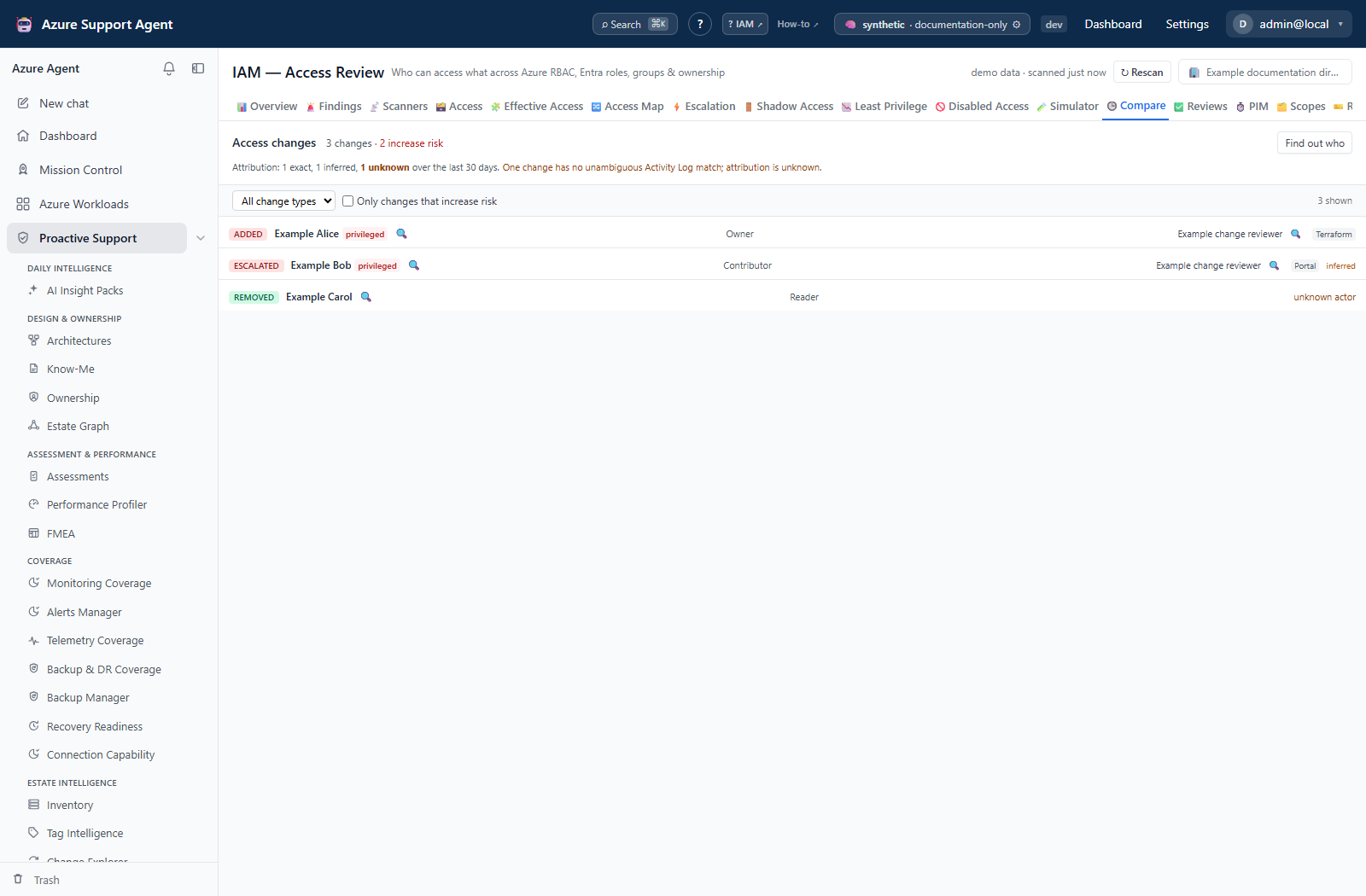
- With changes on screen, select Find out who. It joins the diff to the Azure Activity Log per subscription. It is slow and is deliberately separate from the access refresh.
- Read the summary line before any individual row:
X exact, Y inferred, Z unknown over the last N days. - Read each actor cell as one of three states, never as a name or a blank:
- a name means the change was matched on the assignment id;
- a name with an
inferredmarker means it was matched on scope and time, not on the assignment id — treat it as a lead; - unknown actor means no event matched, because the retention window rolled past the change or because the match was ambiguous and was refused rather than guessed.
- Follow the investigate affordance on a real actor. Whose access changed and who changed it are different investigations, and the second is usually the next question.
- Note any change-source marker on the row.
Expected result: An attributed diff where every change is exactly matched, inferred, or explicitly unknown.
Verification: For one exactly-matched change, find the corresponding authorization event in the Azure Activity Log for that subscription and confirm the actor and timestamp.
Before Find out who has ever been run, the tab states that every actor is unknown for that reason. It does not report a zero-unattributed summary for a tenant where the join was never attempted.
Screenshot notes: This synthetic browser fixture supplies a saved diff and attribution; Find out who was not invoked and no live Activity Log read or backend join produced the example. The counts and actors are illustrative. Its 30-day window matches the window requested by the tab, not a guarantee of complete event coverage.
How to keep a baseline you can compare against later
- Understand the retention rule: full rows are kept for the most recent run plus any pinned run. Thirty runs of a large estate is not a history feature, it is an outage.
- Pin a run you intend to use as a baseline — a quarter end, a pre-migration snapshot, a campaign baseline — with
POST /api/iam/run/{run_id}/pinand a reason. This requiresiam.review. - Compare two named runs with
GET /api/iam/diff?from_run=…&to_run=…. The Compare tab itself always shows the cached diff for the latest run; there is no run picker and no pin control on any screen today. - If either side’s rows have aged out, the response returns
available: falseand a note naming which run is missing and stating that pinning is how to retain one.
Expected result: A retained baseline that stays comparable after later collections have replaced the working set.
Verification: Request the two-run diff and confirm it returns available: true with a change list rather than the retention note.
How to reverse a change safely
- Identify the change and confirm the current state on
/iam/effectiveor/iam/evaluate— the diff describes a movement between two snapshots, not necessarily the state right now. - Open
/iam/simulatorand add the reversing change to the basket. Add every related change together so their interactions are modeled. - Simulate, then read Retained anyway before anything else. If the access survives the reversal because the principal holds it by another route, the reversal is not the remediation.
- Read the orphaned-scopes panel. A scope left with nobody holding owner-level access is the outcome that gets a reversal reverted in a panic later.
- Execute through your approved external process, then refresh the affected scope and the directory.
Expected result: A modeled reversal that distinguishes access genuinely removed from access that only appears to be.
Verification: The next /iam/compare shows the corresponding removed or de_escalated row, and the access no longer evaluates as allowed on /iam/evaluate.
Safety and rollback
Compare and the Simulator are read-only with respect to Azure. Find out who reads the Azure Activity Log and writes the joined result back into this product’s cached diff. Pinning a run writes only this product’s retention flag and is recorded in the audit log with its reason.
There is no in-product reversal. Prepare rollback before executing anything externally: record the principal, role and scope from the snapshot so the assignment can be recreated, or drive the change from a review campaign, whose generated remediation script carries a rollback for every step in the same file.
Never treat an unattributed change as unauthorized. Activity Log retention is finite, and an ambiguous match is refused rather than guessed.
Troubleshooting
| Symptom | Resolution |
|---|---|
The header reads not comparable | There is no earlier snapshot for this connection. Run a second collection. The empty change list means nothing until there is a baseline. |
| A two-run comparison returns a note about retained rows | Full rows are kept only for the most recent run and pinned runs. Pin a run before you need it as a baseline; the note names which side is missing. |
Every actor reads unknown actor and there is no summary line | Find out who has not been run for this diff. The banner above the list says so. |
| Attribution ran but most changes remain unknown | No Activity Log event matched within the window, or the match was ambiguous and was refused. Changes older than Activity Log retention are unattributable by construction. |
An actor carries an inferred marker | It was matched on scope and time rather than on the assignment id. Confirm in the Activity Log before recording it as fact. |
| A change I know happened is absent | Confirm both collections covered that scope. An uncollected scope produces no changes, and that absence is not stability. |
| A group membership change produced no rows | Refresh the directory. Group expansion is what turns a membership change into effective-access changes, and the diff is keyed on the effective principal. |
A path_changed row looks like nothing happened | The access is unchanged; the route to it changed — for example direct access became group-derived. It usually still changes how the access would be revoked. |
An unfamiliar custom role is reported as escalated | Escalation is decided by coarse privilege tier, and an unrecognized custom role is placed at write tier so it is never mislabelled a de-escalation from Reader. Confirm what the role authorizes. |
| An expected row is outside the loaded list | Choose a specific change class or use API offset/limit (maximum 2,000). The UI’s risk-only toggle filters its loaded 500 rows and does not fetch omitted rows; compare filtered_total with the returned length. |